

Five Billing Mistakes That Cost Your Club Every Month
Discover the hidden billing administration errors draining your swim club's revenue and learn practical fixes that save time and money.


It's the third Tuesday of the month, and you're staring at your billing report wondering why revenue is $2,400 short. You know 14 families have failed payments, but three of them swam all last week. Your front desk staff let them in because "the system was acting weird." Meanwhile, your treasurer is asking why you're still charging the Henderson family who moved to Phoenix in April. Sound familiar? These aren't system problems. They're billing administration problems, and they're costing your club real money every single month.
The Real Cost of Billing Mistakes
Most swim club boards focus on big expenses like pool resurfacing or new lane lines. But billing administration errors drain thousands of dollars annually in ways that never show up in a single line item. You lose $50 here when a failed payment isn't caught. Another $75 there when a family uses the pool for two months after canceling. Add up all those small leaks, and you're looking at enough money to hire summer staff or upgrade your timing system.
The most expensive billing mistakes aren't dramatic. They're the quiet, repeated errors that happen because your process depends on someone remembering to do something manually. Let's talk about the five mistakes I see most often, and more importantly, how to fix them.
Failed Payments That Nobody Follows Up On
Here's what happens at most clubs: billing runs automatically on the first of the month. Credit cards decline. ACH payments bounce. The system generates a report. And then... nothing. Someone means to send reminder emails. Someone plans to call those families. But Saturday hits, the pool gets busy, and those failed payments sit there for weeks.
I've seen clubs where 8-12% of monthly billing fails, and half of those members never get contacted until they're two or three months behind. By then, you're either writing off the balance or having an awkward conversation about a $600 debt.
The fix isn't complicated:
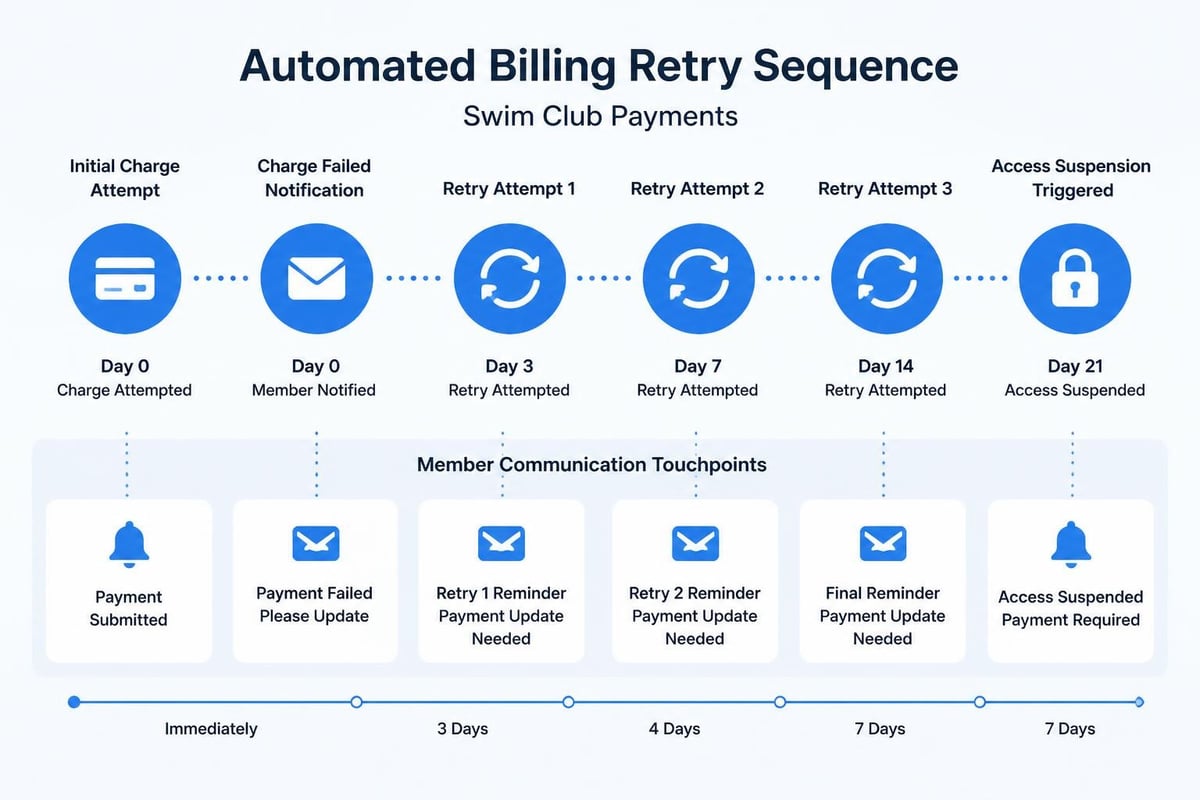
- Set up automatic retry attempts for failed payments (days 3, 7, and 14)
- Send immediate email notifications when payments fail
- Suspend pool access automatically after 7 days of non-payment
- Assign one person to review the failed payment report every Monday morning
- Track your failed payment rate monthly and investigate anything above 5%
The ACH Network provides detailed guidance on return codes and timing that helps you understand why payments fail and when to retry them. Most failures are temporary issues like insufficient funds that clear up within a few days.
Manual Late Fee Application
You have a late fee policy. It's in your bylaws. It's on your website. But do you actually apply late fees consistently? Most clubs don't, and members figure this out quickly. Once people realize late fees are "suggestions," your on-time payment rate drops.
The problem with manual late fee application is that it requires someone to remember, someone to have time, and someone to apply the same rules fairly to everyone. That's three opportunities for failure. Board members get inconsistent treatment. Staff members waive fees for friends. Nobody wants to be "the bad guy" who charges penalties.
| Manual Process Problems | Automated Alternative |
|---|---|
| Takes 2-3 hours monthly | Runs in seconds |
| Inconsistent application | Applied to every account equally |
| Requires staff time | Zero staff involvement |
| Creates fairness questions | Transparent and rule-based |
| Often gets skipped | Never forgotten |
Modern billing administration handles late fees through rules you set once. Payment is 5 days late? System adds $15. Payment is 30 days late? System adds another $25. No exceptions, no manual work, no fairness complaints. You can always waive fees for legitimate hardship cases, but the default should be consistent enforcement.
Access Control and Billing Status
This is where billing administration either works or completely falls apart. Your front desk needs to know instantly whether someone should be allowed in. Not "let me check" or "I think they're okay" or "they said they paid." Instant, accurate, automated answers.
The Saturday Morning Test
Walk up to your front desk on a busy Saturday morning. Ask your check-in person about a member with a failed payment. How long does it take them to figure out if that family should be allowed to swim? If the answer is more than five seconds, you have a problem. If they have to open three different screens, check a spreadsheet, or ask someone else, you're creating delays and errors.
Your check-in system should show billing status automatically:
- Green checkmark for accounts in good standing
- Yellow warning for payments pending or recently failed
- Red block for accounts with suspended access
- Clear display of outstanding balance
- One-click access to payment history
When your front desk staff can't instantly see billing status, they make judgment calls. They let people in who shouldn't swim. They create awkward confrontations. They give inconsistent answers to different families. Every single one of those situations costs you money or member satisfaction.
The PoolPulse platform integrates billing status directly into the check-in interface, so staff members see account health the moment they scan a member card or search a name. No second-guessing, no manual lookups, no mistakes.
Communication Gaps Between Billing and Access
Here's a scenario that happens all the time: A family calls the office Tuesday afternoon to cancel their membership. Your administrator processes the cancellation and marks the account inactive. But that information doesn't reach the weekend check-in staff. Saturday morning, the family shows up, checks in successfully, and swims all day. Now you're either charging them for another month (creating a dispute) or providing free service (losing revenue).
This happens because billing administration and access control live in separate systems or separate parts of the same system without real-time sync. The solution is simple in concept but requires the right tools: every billing change must immediately update access permissions.
- Membership canceled → Access ends that same day
- Payment failed → Access suspended within 24 hours
- New member registered → Access activated immediately
- Account on hold → Check-in blocked automatically
You shouldn't need to export lists, update spreadsheets, or tell staff to "watch out for the Wilson family." The system should handle it.
Revenue Recognition and Reporting
Most swim club boards care about one number: how much money came in this month. But effective billing administration requires understanding several different numbers, and knowing what each one means for your club's financial health.
The Numbers That Actually Matter
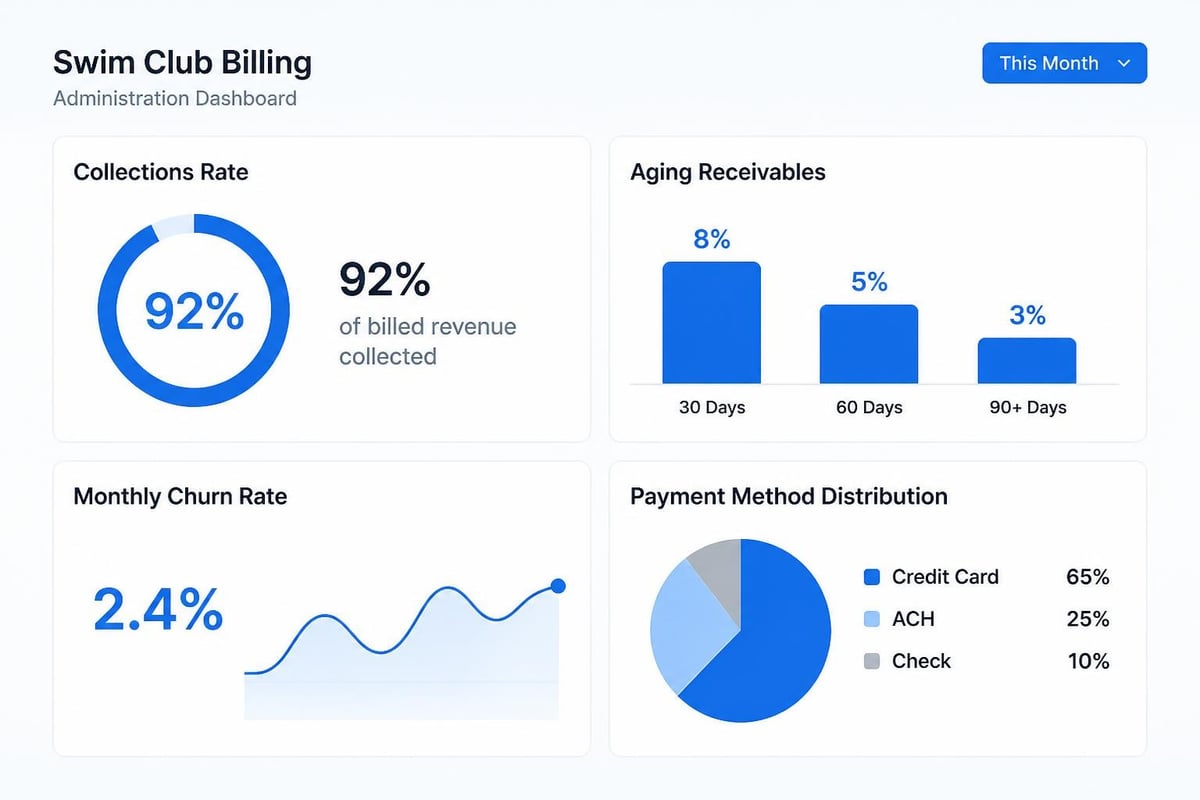
Collections rate tells you what percentage of billed revenue you actually collected. If you billed $45,000 and collected $42,300, your collections rate is 94%. That's not bad, but it means you lost $2,700 to failed payments, cancellations, or write-offs. Track this monthly and investigate any month where it drops below 95%.
Aging receivables shows you how much members owe and how long they've owed it. Money owed for 90+ days is probably never coming back. Money owed for 30-60 days needs immediate attention. This report should trigger specific actions, not just concern.
Churn rate measures how many members you're losing monthly. A 3% monthly churn rate means you're losing 36% of your membership annually. You need to replace all those members just to stay flat. Understanding the relationship between billing problems and cancellations helps you reduce churn.
Here's what good billing administration reporting looks like:
- Weekly: Failed payment dashboard showing who needs follow-up
- Monthly: Collections rate, new member revenue, churn percentage
- Quarterly: Revenue trends, payment method distribution, seasonal patterns
- Annually: Full revenue cycle analysis for budget planning
The IRS requires detailed recordkeeping for business transactions, and that includes your billing records. Your billing administration system should maintain complete audit trails automatically.
The Reconciliation Problem
Every month, someone needs to reconcile your billing system with your bank deposits. This catches errors, identifies missing payments, and ensures your financial records are accurate. But reconciliation is painful when your billing administration isn't organized properly.
Common reconciliation nightmares:
- Payment recorded in the system but never deposited
- Deposit received but no matching invoice
- Partial payments that don't match billing amounts
- Refunds and credits that weren't documented
- Processing fees that don't match expected amounts
The solution is maintaining clean transaction records from day one. Every payment needs a timestamp, payment method, transaction ID, and link to the specific invoice. Every refund needs a reason code and approval. Every credit needs documentation. When these details are captured automatically during billing administration, reconciliation becomes a 15-minute task instead of a three-hour ordeal.
Compliance and Security in Billing
You're handling sensitive financial information every time you process payments. Credit card numbers, bank account details, personal information. That comes with real legal obligations, not just recommendations.
PCI Compliance Isn't Optional
If you accept credit card payments, you must comply with PCI DSS standards . This isn't a suggestion or best practice. It's a requirement. The good news is that modern billing administration platforms handle most PCI compliance for you by never storing full card numbers in your system.
What you need to know about PCI compliance:
- Never write down full credit card numbers
- Don't store CVV codes, ever
- Use a payment processor that maintains PCI compliance
- Limit who has access to payment information
- Update your systems regularly for security patches
Small clubs sometimes think they're too small to worry about security. But a data breach at a 250-member swim club is just as devastating as one at a larger facility. Member trust disappears instantly. Legal liability is the same regardless of club size.
Privacy Regulations and Billing Data
Different states have different rules about how long you must keep financial records and what information you can share. Privacy regulations like GDPR and CCPA affect how you collect, store, and use member payment information.
At minimum, your billing administration should:
- Encrypt stored payment data
- Provide members access to their billing history
- Allow members to update payment methods themselves
- Maintain audit logs of who accessed billing records
- Delete inactive member data according to your retention policy
The PoolPulse security overview details how modern swim club software protects member data while maintaining the accessibility you need for day-to-day operations.
Automation That Actually Saves Time
Let's be honest: you didn't become a swim club administrator because you love billing. You did it because you care about the club, the kids, the community. Billing administration is just something that has to get done. The question is whether it takes 15 hours a month or 2 hours a month.
What to Automate First
Not all automation delivers the same value. Start with the tasks that consume the most time or create the most errors. For most swim clubs, that priority list looks like this:
- Recurring billing - Charges should run automatically on schedule
- Failed payment retry - System attempts collection without manual intervention
- Member notifications - Automatic emails for upcoming charges, failed payments, receipts
- Late fee application - Rules-based penalties applied consistently
- Access suspension - Accounts with billing problems lose privileges automatically
- Revenue reporting - Weekly and monthly reports generated without manual data entry
Each automation you implement removes a potential failure point. Your billing runs whether you remember or not. Failed payments get retried on schedule. Late fees apply fairly to everyone. Members receive consistent communication.
The Things You Shouldn't Automate
Some billing administration tasks still need human judgment. Don't automate:
- Hardship exceptions - Sometimes members need payment plans or fee waivers
- Dispute resolution - Billing errors happen; someone needs to investigate
- Unusual situations - Pro-rated charges, membership transfers, special arrangements
- Policy decisions - When to write off bad debt, how to handle long-term delinquency
- Member communication - Automated emails are great, but serious conversations need personal attention
The goal of billing administration automation isn't eliminating human involvement. It's eliminating repetitive work so you can focus on situations that actually require thought and decision-making.
Setting Up Systems That Work
You've probably noticed a pattern in everything I've covered: good billing administration isn't about working harder. It's about having systems that prevent problems instead of requiring you to fix them constantly. Let me walk you through how to build those systems at your club.
Start With Your Billing Calendar
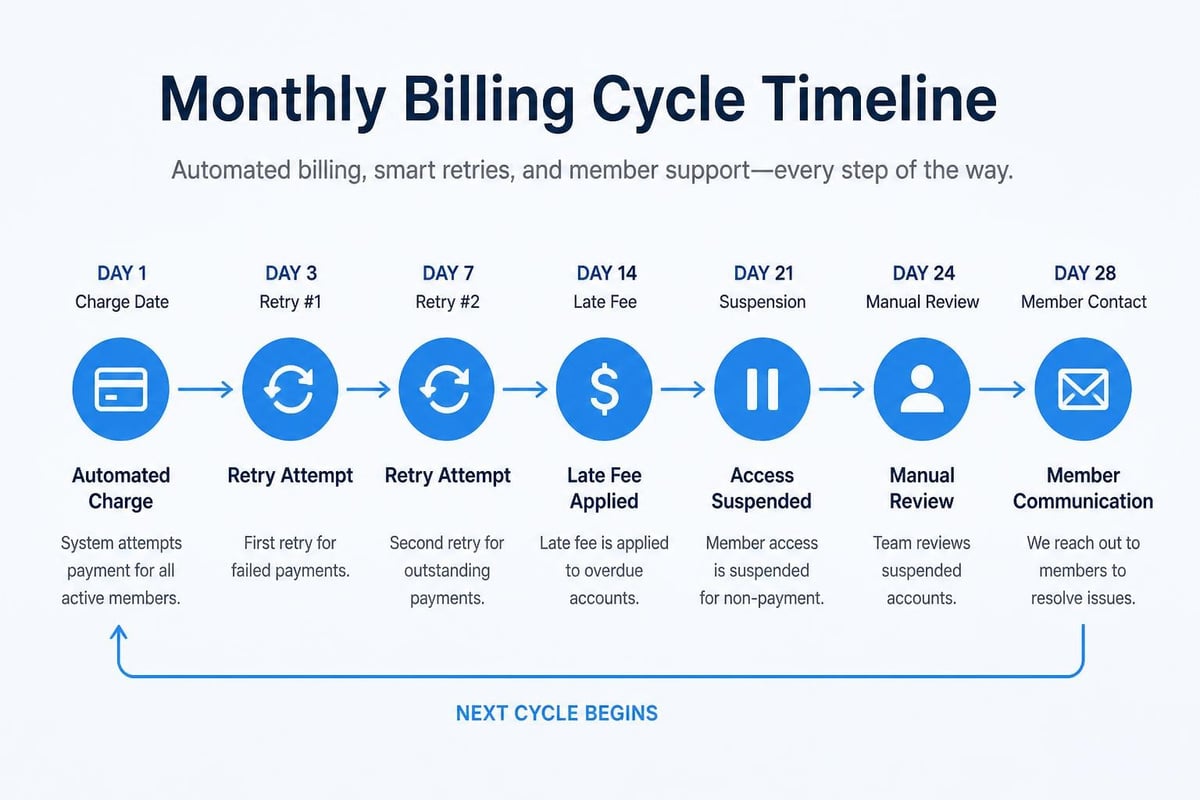
Map out your entire billing cycle on a calendar. When do charges process? When do you send reminder emails? When do late fees apply? When do you suspend access? When do you follow up on failed payments? Having a documented schedule removes the guesswork.
Sample monthly billing calendar:
- 1st: Recurring charges process automatically
- 2nd: System sends receipts to successful payments
- 3rd: First automated retry for failed payments
- 5th: Manual review of still-failed payments
- 6th: Late fees applied to accounts 5+ days overdue
- 7th: Second automated retry for failed payments
- 8th: Access suspension for accounts 7+ days delinquent
- 10th: Personal outreach to members with suspended access
- 14th: Third and final automated retry
- 15th: Manual review meeting to discuss accounts 14+ days delinquent
- 30th: Preview next month's billing run
This calendar becomes your billing administration playbook. New staff can follow it. Board members can understand it. Members know what to expect.
Document Your Policies Clearly
Your billing policies should answer every common question before members need to ask. How much are dues? When are they charged? What happens if a payment fails? How do you cancel? What's your refund policy? How do late fees work?
Write these policies in plain language and make them easy to find. Put them on your website. Include them in new member packets. Reference them in your automated billing emails. When policies are clear and visible, you have fewer disputes and easier conversations when problems arise.
The FTC provides guidance on billing disclosures that helps you communicate fees and charges clearly while staying compliant with consumer protection laws.
Train Your Team
Everyone who touches billing administration needs to understand the basics, even if they're not processing charges themselves. Front desk staff should know how to check billing status. Swim coaches should understand that suspended members can't participate. Board members should recognize key financial metrics.
Essential billing administration training:
- How to check a member's account status
- What to do when someone claims they paid but the system shows they didn't
- How to direct billing questions to the right person
- Where to find current policies
- When to escalate unusual situations
Training doesn't need to be formal or lengthy. A 20-minute walkthrough of your swim club management software and a one-page quick reference guide cover most situations.
Measuring Success
How do you know if your billing administration is actually working? Track metrics that matter and review them monthly. You're looking for trends, not just numbers.
Key Performance Indicators
Collections rate should be 95% or higher. If you're consistently below that, you have process problems. Either your payment retry system isn't aggressive enough, your access suspension policy isn't enforced, or you're not following up on delinquent accounts.
Failed payment rate should be under 5%. Higher than that suggests outdated payment methods, member financial stress, or technical problems with your payment processor. Investigate what's causing failures and address the root causes.
Average days to collect should be under 7. This measures how long it takes to successfully collect payment after the initial charge attempt. Faster is better. If you're averaging 15+ days, your retry schedule needs work.
Dispute rate should be under 2%. Frequent billing disputes indicate unclear policies, system errors, or communication problems. Each dispute costs staff time to investigate and resolve.
Manual intervention time should decrease quarterly. As you automate more processes, you should spend less time on routine billing tasks. Track hours spent monthly and set reduction targets.
Monthly Billing Review
Schedule 30 minutes monthly to review these metrics with your treasurer or finance committee. Ask three questions:
- What's working well this month?
- What problems appeared, and what caused them?
- What one thing could we improve next month?
This regular review catches problems early and drives continuous improvement. You're not looking for perfection. You're looking for steady progress toward better systems and fewer manual interventions.
Making the Switch to Better Systems
Maybe you're reading this and thinking, "We're doing half of these things wrong." That's okay. Most swim clubs are. The question isn't whether your current billing administration is perfect. The question is whether you're ready to improve it.
Signs It's Time to Upgrade
You know you need better billing administration systems when:
- You're spending 10+ hours monthly on billing tasks
- Failed payments consistently exceed 5% of monthly volume
- Front desk staff can't quickly verify member payment status
- Reconciliation takes longer than one hour monthly
- You've written off more than $500 in bad debt this year
- Board members regularly question billing accuracy
- Member complaints about billing issues are increasing
Any one of these signals suggests your current approach isn't working. Multiple signals mean you're losing real money every month to inefficiency and errors.
What to Look for in Billing Software
Modern billing administration platforms designed for swim clubs handle most common problems automatically. When evaluating options, prioritize these features:
- Automated recurring billing with flexible schedules
- Intelligent payment retry with configurable timing
- Real-time access control integration linking billing status to check-in
- Member self-service portal for updating payment methods
- Comprehensive reporting covering all key metrics
- PCI-compliant payment processing protecting member data
- Automated communication for receipts, failures, and reminders
The PoolPulse features page shows how modern swim club software integrates billing administration directly into your daily operations, eliminating the disconnected systems that create most problems.
Don't settle for generic billing software that wasn't built for membership organizations. You need tools that understand swim club operations, seasonal patterns, family accounts, and the specific challenges of recreational facility management.
Effective billing administration protects your club's revenue while reducing the time you spend chasing payments and fixing errors. The mistakes we covered cost real money every month, but they're fixable with the right systems and processes. PoolPulse was built specifically to solve these problems for swim clubs, tennis facilities, and HOA pools. Our platform automates recurring billing, integrates payment status with access control, and provides the reporting you need to stay on top of club finances. Explore how PoolPulse can streamline your billing administration and help you spend less time on accounting and more time building your community.

Five Front-Desk Tasks Your Swim POS Should Handle
Your front desk shouldn't need three systems to check in a swimmer. Here's how modern swim POS systems save time and reduce errors.

When Your Check-In Line Proves Software Is Too Slow
Discover how software timing affects your swim club's daily operations, from check-ins to billing, and why faster response times mean happier members.

Five Ways Clubs Lose Money Without Knowing It
Most swim clubs leak thousands in revenue each season. Learn five hidden profit drains and practical fixes to recover revenue now.
Want to see if PoolPulse is a good fit for your club?
Book a walkthrough and we'll show you exactly how PoolPulse can help based on your club's needs, goals, and current processes.