

Five Front-Desk Tasks Your Swim POS Should Handle
Your front desk shouldn't need three systems to check in a swimmer. Here's how modern swim POS systems save time and reduce errors.


It's Saturday morning at 9 a.m., and your front desk has a line out the door. A parent wants to pay their balance, another needs to register a guest, and someone else is asking about swim lesson availability. Your staff member is toggling between three different screens, and you can see the frustration building. Sound familiar? This scenario plays out every weekend at swim clubs across the country, and it all comes down to one question: is your swim pos actually making life easier, or is it adding to the chaos?
What a Swim POS Actually Does (and Doesn't Do)
Let's start with the basics. A swim pos is the system your front desk uses to handle money, check in members, and manage daily operations. The term "POS" stands for point of sale, but in the swim club world, it's really the command center for everything that happens at your facility.
Here's what catches most clubs off guard: not every swim pos is designed for swim clubs. Some clubs are using generic retail systems that were built for coffee shops or boutiques. Others are patching together separate tools for payments, check-ins, and member management. The result? Your staff spends more time managing the technology than helping members.
The Real Job of Your Front Desk System
Your swim pos should handle these five essential tasks without requiring your staff to switch between multiple programs:
- Check in members and verify their status
- Process payments for dues, lessons, and merchandise
- Register guests and collect waiver signatures
- Look up account balances and membership details
- Enroll members in programs and update their information
When your system can't do all five seamlessly, your staff develops workarounds. They write things on sticky notes. They ask members to come back later. They make mistakes because they're rushing. And every workaround costs you time and money.

The Five-Minute Front Desk Test
Want to know if your current swim pos is actually working? Try this simple test during your next busy period. Time how long it takes your staff to complete this common scenario:
A member walks up to check in for lap swim. They want to add a guest, pay their outstanding balance of $47, and ask about signing their child up for the next swim lesson session. How many screens does your staff need to open? How many different logins? How long does the member wait?
If this takes more than five minutes, your system is costing you money. Here's why: multiply that extra time by every interaction, every day, all season long. A system that adds two extra minutes to each transaction means your staff handles fewer members per hour, lines get longer, and members get frustrated.
What Good Looks Like
When PoolPulse clients run this same test, here's what happens:
- Staff scans or searches for the member's account (10 seconds)
- Check-in button confirms active status (5 seconds)
- Add guest, digital waiver auto-sends to their phone (20 seconds)
- Process $47 payment with card reader (30 seconds)
- View upcoming lesson sessions, enroll child, confirmation email sends (45 seconds)
Total time: under two minutes. One screen. One login. One happy member who feels like you've got your act together.
Security Standards You Can't Ignore
Let's talk about something that keeps swim club boards up at night: payment security. When you're processing credit cards at your swim pos, you're responsible for protecting that data. The PCI Security Standards Council sets the rules, and ignoring them isn't an option.
Here's what this means in plain English: your swim pos needs to encrypt card data immediately when it's swiped or entered. The card numbers shouldn't be stored on your computer or visible to your staff. If someone hacks your system, they shouldn't be able to steal usable payment information.
Many swim clubs don't realize they're violating PCI standards until it's too late. Old systems that store full card numbers in a spreadsheet? That's a violation. Staff writing down card numbers on paper forms? Also a violation. Using a card reader that doesn't encrypt data? You guessed it, violation.
| Security Feature | Why It Matters | What Happens Without It |
|---|---|---|
| End-to-end encryption | Card data is scrambled immediately | You're liable for any breach |
| Tokenization | Replaces card numbers with random tokens | Card numbers can be stolen |
| PCI DSS compliance | Meets payment industry security standards | Fines, loss of merchant account |
| Regular security updates | Protects against new threats | Vulnerabilities stay open |
The Federal Trade Commission provides cybersecurity guidance that applies directly to swim clubs handling member payments. Bottom line: if you're taking cards, you need a swim pos that handles security automatically, so your staff doesn't have to become cybersecurity experts.
Access and Inclusion at Your Front Desk
Here's a question most clubs don't think about: can everyone physically use your swim pos setup? We're not just talking about your staff. Think about the actual physical counter, screen placement, and payment terminal.
The U.S. Access Board provides technical standards for aquatic facilities, and while most clubs focus on pool lifts and ramps, your front desk matters too. If a member uses a wheelchair, can they see the screen? Can they reach the card reader? Can they sign a waiver on a tablet?
Making Your Front Desk Work for Everyone
Modern swim pos systems should support accessibility without requiring major renovations:
- Adjustable screen angles so members of different heights can view their information
- Card readers with audio feedback for members with visual impairments
- Digital waivers that can be completed on a member's own device
- Voice commands for staff with mobility limitations
- High-contrast display modes for easier reading
These aren't just nice-to-have features. The ADA guidance on ticket sales and point-of-sale transactions makes it clear: your swim pos needs to be accessible to all members. And honestly? When you make things easier for members with disabilities, you make things easier for everyone.

Integration: The Feature Nobody Talks About
Here's where most swim clubs run into trouble: their swim pos doesn't talk to their membership system. Or it talks to the membership system but not the lesson scheduling tool. Or everything connects, but the pool gate access system is still separate. You end up with a fragmented mess.
Think about what happens when systems don't integrate. A member pays their dues at the front desk using your swim pos. Your staff processes the payment, but now they have to manually update the membership system. Then they need to update the gate access system so the member's key card works again. Three different systems, three different updates, three chances for mistakes.
What Integration Actually Saves
Let's get specific about time savings. One PoolPulse client tracked their front desk operations before and after moving to integrated swim club management software . Here's what they found:
Before integration:
- Average transaction time: 4.2 minutes
- Staff hours spent on manual data entry: 12 hours per week
- Payment/access system sync errors: 8-10 per week
After integration:
- Average transaction time: 1.8 minutes
- Staff hours spent on manual data entry: 0 hours per week
- Payment/access system sync errors: Less than 1 per month
That's 12 hours per week recovered. For a club paying staff $15 per hour, that's $9,360 saved annually. Just from eliminating duplicate data entry.
Mobile and Contactless Payment Trends
Walk into any coffee shop in 2026, and you'll see people tapping their phones to pay. Your swim club members expect the same convenience. The NFC Forum's recent industry research shows contactless payment adoption continuing to grow, especially among younger demographics.
But here's what matters for your swim pos: mobile payments aren't just about speed. They're about reducing physical contact (still relevant post-pandemic), eliminating the need to carry wallets to the pool, and meeting member expectations.
What Your Swim POS Should Accept
Modern payment processing isn't optional anymore. Your system should handle:
- Traditional credit and debit cards (chip and swipe)
- Apple Pay, Google Pay, and Samsung Pay
- Contactless card taps
- ACH bank transfers for recurring dues
- Digital wallet payments
- QR code payments for mobile-first members
You might be thinking, "Do we really need all of that?" Consider this: during peak summer hours, every second counts. Contactless payments are consistently 30-40% faster than chip cards. When you're checking in 200 members on a Saturday, that difference adds up to real time savings.
Reporting: Your Board's Best Friend
Let's talk about board meetings. Every quarter, your treasurer wants to know: how much did we collect in dues? What's our guest revenue? How many members are behind on payments? With a disconnected swim pos, pulling those reports means exporting data from multiple systems and building spreadsheets manually.
A properly configured swim pos should answer every financial question your board asks without requiring a finance degree. The system should track revenue by category, show payment trends over time, and flag potential issues before they become problems.
Reports That Actually Matter
Here are the reports your swim pos should generate automatically:
| Report Type | What It Shows | How Often You Need It |
|---|---|---|
| Daily revenue summary | All income by payment type and category | Daily close-out |
| Outstanding balances | Members with unpaid dues or fees | Weekly |
| Payment method breakdown | Cash vs. card vs. ACH percentages | Monthly |
| Year-over-year comparison | Revenue trends across seasons | Quarterly |
| Program enrollment revenue | Income from lessons, camps, teams | After each registration period |
The IRS guidance on Form 1099-K reporting affects how swim clubs need to track and report payment processor transactions. Your swim pos should make tax reporting straightforward, not a nightmare every January.
Handling Swim Lesson Registration at the Front Desk
Here's a scenario that happens constantly: a parent walks up during open swim and asks if their child can join the next swim lesson session. In that moment, your front desk staff needs to check availability, explain the schedule, process payment, and enroll the child. Your swim pos either makes this easy or impossible.
The best systems let your staff see lesson availability in real time, right from the check-in screen. No need to call the swim director or check a separate scheduling system. Staff can enroll the child, process payment, and send confirmation all within the same transaction.
The Lesson Registration Workflow
When a parent wants to register for swim lessons at your front desk, here's what should happen:
- Staff pulls up available lesson sessions filtered by age and skill level
- Parent sees schedule, instructor names, and remaining spots
- Staff enrolls the child with one click
- System prompts for any required waivers or health information
- Payment processes through the same swim pos interface
- Confirmation email sends to parent automatically
- Instructor roster updates in real time
This entire process should take less than three minutes. If it's taking longer, you're losing registrations. Parents will say "let me think about it" and never come back. Speed matters, especially during peak registration periods.
Managing Member Accounts and Balances
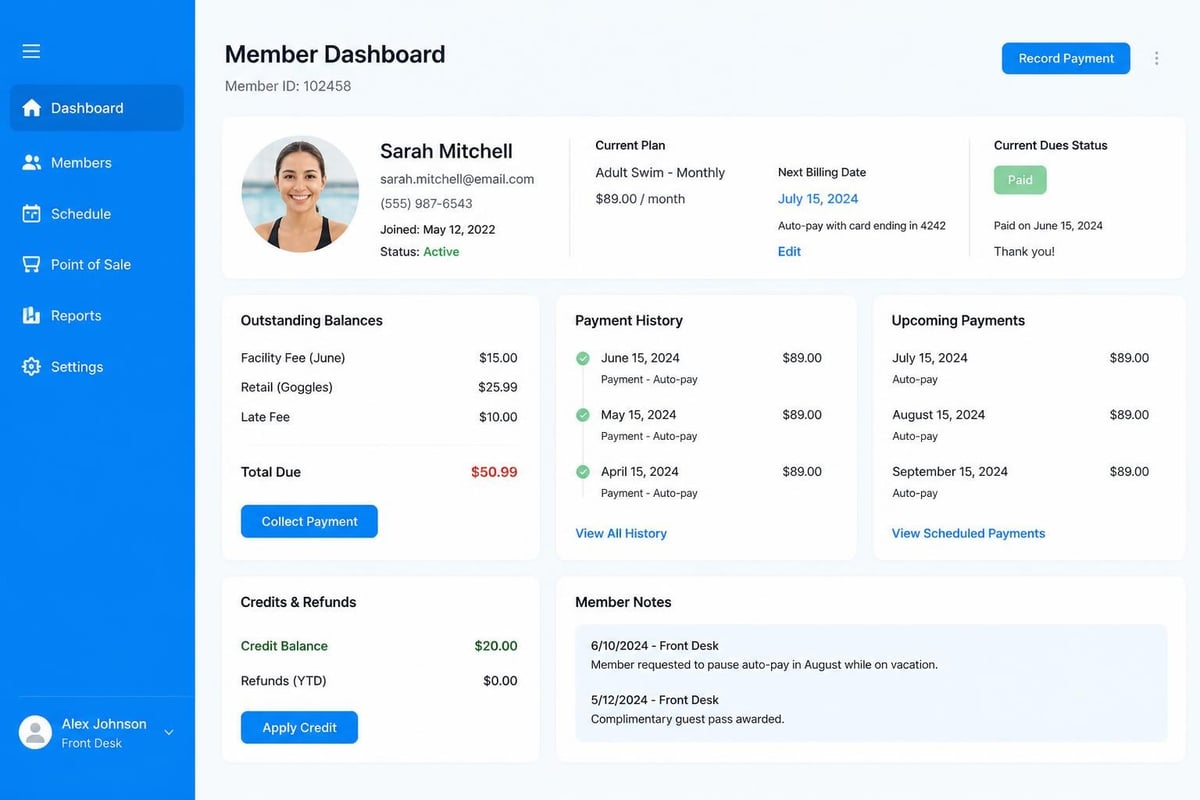
One of the most common front desk questions is also one of the most frustrating: "What's my balance?" With a disconnected swim pos, your staff might not know. They're looking at payment history in one system, but membership dues are tracked separately. Late fees might be in a third place.
Your swim pos should show a complete financial picture of every member account instantly. When someone asks about their balance, your staff should see:
- Current dues status (paid through which month)
- Any outstanding fees or charges
- Payment history with dates and amounts
- Scheduled recurring payments
- Credits or refunds issued
This information needs to be accurate and real-time. Nothing frustrates members more than being told they owe money when they know they already paid. Nothing frustrates staff more than having to say "I'll check and call you back" for a simple balance question.
Guest Check-In and Day Passes
Summer weekends mean guests. Lots of them. Your swim pos needs to handle guest registration without slowing down member check-ins. Here's where many clubs create unnecessary bottlenecks.
The problem usually starts with paper. Guest signs in on a clipboard, staff manually enters their information later (or never), payment happens separately, and there's no record of how many times this guest has visited. The USA Swimming club membership resources remind us that tracking guest usage matters for insurance and capacity planning.
Streamlining Guest Management
Your swim pos should handle guests like this:
First-time guest:
- Quick registration (name, phone, emergency contact)
- Digital waiver sent to their phone immediately
- Payment processed and guest pass printed
- Account created for faster future visits
Returning guest:
- Staff searches by phone number or name
- Previous information auto-fills
- Waiver already on file (if still valid)
- Payment and check-in complete in seconds
Some clubs offer guest punch cards or multi-visit passes. Your swim pos should track these automatically. When a guest checks in, the system should show how many visits remain and alert staff when they need to purchase more.
Staff Training and System Complexity
Here's an uncomfortable truth: the more complicated your swim pos, the more training your seasonal staff needs. And let's be honest, you're probably hiring high school and college students who work a few months each summer. They don't have time to become experts in three different software systems.
The best swim pos systems are intuitive enough that new staff can learn the basics in under an hour. Core functions like check-in, payment processing, and guest registration should be obvious. Advanced features like refunds or account adjustments can have an extra confirmation step, but daily tasks should be simple.
Training Shortcuts That Work
When you're bringing on seasonal staff, these training strategies help them learn your swim pos quickly:
- Role-based access: New staff only see the functions they need, reducing overwhelm
- Visual workflows: Screen prompts guide them through each transaction step
- Built-in help: Context-sensitive tips appear when they hover over features
- Practice mode: Staff can test transactions without affecting real accounts
- Quick reference cards: One-page guides for common scenarios taped near the screen
If your staff needs more than two training sessions to handle routine transactions, your swim pos is too complicated. Period.
Handling Refunds and Account Adjustments
Mistakes happen. A parent pays twice by accident. You need to issue a refund for a rained-out event. A member's bank rejects an ACH payment. Your swim pos needs to handle these situations cleanly, with a clear audit trail.
Many clubs resist giving front desk staff refund permissions because they're worried about fraud or mistakes. But here's the catch: if your manager has to approve every refund, you're creating delays that frustrate members. The solution isn't restricting access, it's having a system with proper controls.
Good refund controls in a swim pos:
- Require supervisor code for refunds over a certain amount
- Log every refund with timestamp and staff name
- Email receipt to member and manager automatically
- Flag accounts with multiple refunds for review
- Prevent cash refunds without matching original payment method
These controls let your staff solve member problems quickly while protecting your club from abuse.
Hardware That Actually Lasts at a Pool
Let's talk about something nobody mentions in software demos: pools are harsh environments for electronics. Humidity, chlorine vapors, splashing water, and temperature swings all kill typical office equipment faster than you'd expect.
Your swim pos hardware needs to survive these conditions. That means:
- Sealed keyboards or touchscreens that resist water damage
- Card readers with moisture protection that don't fail mid-season
- Receipt printers designed for high-humidity environments
- Tablets or screens with anti-glare coating for outdoor check-in stations
- Battery backup systems so a brief power blip doesn't shut down operations
One PoolPulse client learned this the hard way when they installed standard retail POS hardware at their outdoor pool gate. Three months into summer, the card reader died from humidity exposure. They had to process payments manually for two days while waiting for a replacement. The lost efficiency cost them more than buying proper equipment would have.
Seasonal Shutdown and Startup
If your club closes for winter, your swim pos needs to handle seasonal transitions smoothly. When you shut down in September, all your member data, payment history, and balances need to be preserved securely. When you reopen in May, everything should be exactly where you left it.
This sounds obvious, but clubs running outdated systems sometimes discover that data gets corrupted over the off-season. Or subscription fees keep processing even though the facility is closed. Or staff passwords expired and nobody can log in on opening day.
The Seasonal Checklist
Before closing for the season, your swim pos should help you:
- Process all final payments and close out accounts
- Generate year-end financial reports for your treasurer
- Pause recurring billing for seasonal members
- Back up all data securely
- Document any outstanding balances to address next season
- Update staff access permissions for next year
When you reopen, the system should make it easy to:
- Reactivate member accounts with current information
- Resume billing schedules without manual intervention
- Update rates and fees for the new season
- Onboard new staff with fresh login credentials
- Generate opening day reports showing membership status
Cloud-based swim pos systems handle most of this automatically. Legacy systems installed on a single computer? You're probably handling it all manually, which creates room for errors.
Multi-Location Scenarios
Growing clubs sometimes operate multiple facilities or a main pool plus satellite locations. Maybe you have a competition pool and a separate teaching facility. Or your HOA manages three community pools. Your swim pos should unify operations across all locations.
Members shouldn't have different accounts at each pool. Staff shouldn't need separate logins for each location. And your treasurer definitely shouldn't be consolidating reports from multiple systems manually.
What multi-location support looks like:
- Single member database shared across all facilities
- Location-specific access rules and permissions
- Consolidated financial reporting with location breakdowns
- Member credits and balances that work at any facility
- Centralized scheduling for programs that move between pools
The PoolPulse platform was built specifically for organizations managing multiple facilities, recognizing that member convenience and operational efficiency both depend on unified data.
The Real Cost of Your Current System
Most swim clubs focus on monthly software fees when evaluating their swim pos. But the real cost includes hidden expenses that don't appear on invoices:
Staff time costs:
- Hours spent on duplicate data entry
- Time training seasonal employees on complex systems
- Manager time troubleshooting technical issues
- Board member hours reconciling inconsistent reports
Error costs:
- Missed payments due to system failures
- Refunds issued for billing mistakes
- Accounting time fixing data discrepancies
- Member frustration leading to cancellations
Opportunity costs:
- Transactions not completed because lines are too long
- Lesson registrations lost because enrollment is too complicated
- Guest revenue missed because the process is cumbersome
- Member referrals that don't happen because the experience is frustrating
Add these up, and that "cheap" swim pos costing you $50 a month might actually be costing you thousands in lost efficiency and revenue. The revenue recovery features in modern swim club software often pay for themselves within the first season.
Making the Switch Without Disrupting Operations
If you've read this far, you're probably thinking your current swim pos isn't cutting it. But the idea of switching systems mid-season feels overwhelming. How do you migrate member data? Train staff? Avoid check-in chaos?
The good news: modern implementations are designed for smooth transitions. Here's what the process typically looks like:
Phase 1: Data Migration (Before Launch)
- Export member data from your old system
- Clean up duplicates and outdated information
- Import into new swim pos
- Verify all accounts and balances match
Phase 2: Staff Training (1-2 Weeks Before)
- Train managers on full system capabilities
- Train front desk staff on daily transaction workflows
- Provide reference materials and practice accounts
- Run parallel systems briefly to build confidence
Phase 3: Go-Live (Opening Day)
- New swim pos becomes primary system
- Staff support available for questions
- Old system accessible as backup for first week
- Monitor transaction times and member feedback
Phase 4: Optimization (First Month)
- Adjust workflows based on staff feedback
- Customize reports for board requirements
- Enable additional features as staff becomes comfortable
- Decommission old system completely
The PoolPulse migration support includes data transfer assistance and dedicated onboarding to minimize disruption. Most clubs are fully operational on their new swim pos within their first week.
Future-Proofing Your Front Desk Operations
Technology changes fast. The swim pos you choose today should still serve you well in five years. That means looking beyond current features to consider how the system evolves.
Ask potential vendors these questions:
- How often do you release updates and improvements?
- Are updates automatic, or do they require manual installation?
- What's your roadmap for new payment methods and technologies?
- How do you handle regulatory changes (tax rules, security standards)?
- Will the system scale if our membership grows significantly?
- What happens if you're acquired by another company?
Cloud-based systems generally age better than installed software because updates happen automatically and infrastructure improves continuously. Systems built by developers who specialize in swim clubs (rather than generic POS vendors) also tend to anticipate industry-specific needs better.
The PoolPulse release schedule shows consistent improvement and new capabilities added regularly, reflecting ongoing investment in the platform rather than one-and-done software sales.
Member Self-Service and Your Swim POS
Here's a question worth asking: does every transaction really need to happen at your front desk? Modern members expect to manage their own accounts online. They want to update payment methods, check their balance, and register for programs without calling or visiting during office hours.
Your swim pos should connect to a member portal that lets people handle routine tasks themselves:
- View and pay outstanding balances
- Update credit card information
- Register family members for lessons and programs
- Purchase guest passes in advance
- Download receipts and payment history
- Update emergency contacts and preferences
When members can handle these tasks on their own schedule, several good things happen. Your front desk lines get shorter. Staff spends less time on routine requests. Members feel more in control. And you reduce after-hours phone calls.
The key is integration. Self-service only works if the member portal and your swim pos share the same real-time data. When a member pays online at 11 p.m., your front desk should see that payment immediately the next morning. No manual updating required.
Compliance and Record-Keeping
Swim clubs need to maintain records for multiple reasons: taxes, audits, insurance claims, and member disputes. Your swim pos is creating those records with every transaction, but are you storing them properly?
Payment records typically need to be retained for 3-7 years depending on your state and IRS requirements. Waiver signatures might need to be kept even longer. If a member disputes a charge or you face an audit, you need to produce documentation quickly.
Essential records your swim pos should maintain:
- Transaction logs with date, time, amount, and staff member
- Payment method and confirmation numbers
- Waiver signatures with timestamp
- Account balance adjustments and explanations
- Refund history with approvals
- Member enrollment and program participation
Cloud-based systems handle retention automatically, with encrypted backups stored in multiple locations. Local systems require you to manage backups manually. Miss a backup, and you could lose irreplaceable records.
The PoolPulse data retention policies ensure compliance while giving clubs easy access to historical information when needed.
Getting Buy-In from Your Board
You're convinced your club needs a better swim pos. Now you need to convince your board to approve the budget. Here's how to make your case effectively:
Focus on outcomes, not features. Your board doesn't care about "cloud-based architecture" or "AI-powered insights." They care about saving money, reducing complaints, and protecting the club from liability.
Frame your presentation around these points:
- Time savings: Show how many staff hours per week will be recovered
- Error reduction: Explain how automated processes prevent costly mistakes
- Member satisfaction: Share specific complaints that the new system will solve
- Revenue protection: Demonstrate how better tracking prevents missed payments
- Risk mitigation: Address security and compliance improvements
Bring specific numbers. If possible, run a pilot or trial that lets you measure actual results. Boards respond to data. "This will save us approximately 10 hours per week" is more convincing than "This will be much better."
The PoolPulse business case resources help you build a compelling presentation with ROI calculations specific to your club's size and operations.
The right swim pos doesn't just process payments. It makes your entire front desk operation smoother, keeps your members happier, and gives your staff the tools they need to focus on service instead of wrestling with technology. If your current system requires workarounds, slows down transactions, or leaves your team frustrated, it's time to evaluate better options. PoolPulse brings all your swim club operations into one modern, integrated platform designed specifically for how clubs actually work, not how software companies think they should work.

The Five-Minute Front Desk Test for Swim Clubs
Does your front desk slow you down or speed things up? Run this quick test to spot gaps in member check-ins, billing questions, and daily workflow.

Is Your Swim Club Ready for an Emergency? The Ready Club Test
Can your swim club handle an emergency? Test your readiness with this practical checklist for club operators, from staff training to member communication.

The Monthly Billing Chaos Test for Swim Clubs
Running monthly billing at your swim club shouldn't feel like chaos. Take this test to find billing mistakes before they cost you time and money.
Want to see if PoolPulse is a good fit for your club?
Book a walkthrough and we'll show you exactly how PoolPulse can help based on your club's needs, goals, and current processes.