

Five Team Problems Your Software Should Fix (Not Create)
Running a swim club means managing staff, shifts, and front desk chaos. Here's how team management software should help, not add to your workload.


You know that feeling when your Saturday morning front desk volunteer calls in sick and nobody knows how to process a guest registration? Or when your head coach updates membership notes but your billing person never sees them? These aren't technology problems. They're team management problems that happen to involve technology.
Running a swim club means coordinating board members, seasonal staff, front desk volunteers, coaches, and maintenance crews. Everyone needs different information at different times. And when things fall through the cracks, members notice. The right team management software should make your daily operations smoother, not give you another system to manage. Let's look at five common team problems and what actually fixes them.
The Front Desk Handoff Problem
Every club has experienced this. Your morning person checks in members using one method. Your evening person does it differently. Weekend volunteers? They're making it up as they go.
This inconsistency creates real problems:
- Members get different answers depending on who's working
- Guest policies get enforced randomly
- Nobody knows if waivers were actually signed
- Balance discussions become awkward when staff can't see account history
The issue isn't training. You've probably trained everyone three times. The issue is that people forget details when they only work a few shifts per month.
What Actually Helps
Good team management software gives everyone the same view of member information. When your Saturday volunteer opens a member profile, they should see:
- Current membership status and expiration date
- Outstanding balance (if any)
- Recent visit history
- Notes from other staff members
- Guest privileges and limits
This isn't about features. It's about reducing the mental load on part-time staff. They shouldn't need to remember policies or procedures. The system should show them what to do next.

| Problem | Band-Aid Fix | Real Solution |
|---|---|---|
| Inconsistent check-ins | Print more checklists | System guides each step |
| Policy confusion | More training sessions | Rules built into workflow |
| Missing information | Group text chains | Shared notes in profiles |
| Guest tracking errors | Manual log books | Automatic guest counting |
Teams perform better when leadership focuses on clear processes and communication rather than expecting everyone to memorize everything. Your software should be the process.
The "Who's Working When" Chaos
February is slow, so you reduce front desk hours. May hits and suddenly you need coverage for early morning lap swim, afternoon lessons, and evening open swim. Someone needs to coordinate schedules, track who's available, and handle last-minute changes.
Most clubs handle this through:
- Text message chains that span 47 messages
- Shared Google calendars that nobody updates
- A printed schedule that's outdated by Tuesday
- The manager's personal notes scattered across three notebooks
This creates scheduling chaos. Staff don't know when they're working until someone texts them. Managers spend hours each week just figuring out coverage. And when someone calls in sick, it triggers a cascade of panicked messages.
Scheduling That Actually Works
Team management software should make scheduling visible and flexible. Not complicated. Not full of features you'll never use. Just functional.
Key elements that matter:
- Everyone sees their shifts in one place
- Staff can mark availability ahead of time
- Shift swaps don't require manager approval for every change
- Mobile access so people can check schedules anywhere
The Team Topologies framework emphasizes that teams work best when communication pathways are clear and simple. Your scheduling system is a communication pathway. Make it obvious.
I've watched clubs move from text-based scheduling to integrated systems and save 3-4 hours per week just on coordination. That's time the manager could spend on member retention, not playing scheduling Tetris.
The Information Silo Problem
Your board wants to know renewal rates. Your head coach needs to track lesson enrollment. Your front desk needs to process payments. Everyone's asking the same manager for different reports.
Here's what typically happens:
- Board member emails asking for membership numbers
- Manager pulls up three different spreadsheets
- Numbers don't quite match between systems
- Manager spends 45 minutes reconciling data
- Sends report
- Board member asks follow-up question
- Repeat
This isn't sustainable during peak season when you're also handling daily operations. The problem is that information lives in different places depending on who entered it.
Breaking Down the Silos
Effective team management means everyone can access the information they need without creating work for someone else. This doesn't mean everyone sees everything. It means proper permissions and accessible reporting.
Consider how your current setup handles these common scenarios:
| Question | Current Process | Better Approach |
|---|---|---|
| How many active members? | Manager counts manually | Dashboard shows real-time count |
| Which memberships expire next month? | Export and filter spreadsheet | Automated renewal report |
| Who hasn't checked in recently? | No good way to know | Engagement tracking built in |
| What's our monthly revenue? | Reconcile multiple sources | Unified financial dashboard |
When your swim club management software centralizes member data, billing, and attendance, you eliminate the information silos that slow everything down. Research shows that team performance improves significantly when members can coordinate their expertise effectively .
Board members can log in and see membership trends. Coaches can check lesson rosters. Front desk staff can process payments. Nobody's waiting on the manager to pull reports.
The Task Assignment Black Hole
Someone needs to update the website with summer hours. The pool heater needs maintenance. Three members have billing questions. The board wants a facilities improvement proposal by next week.
Who's handling what?
In most clubs, tasks exist in:
- Email threads that get buried
- Verbal conversations that get forgotten
- Meeting notes that nobody reads again
- The manager's increasingly frantic to-do list
Then board meetings roll around and someone asks, "Hey, what happened with that thing we discussed last month?" Awkward silence. Nobody remembers who was supposed to handle it.
Making Tasks Visible
Team management software should include basic task assignment. Not project management overkill. Just the ability to:
- Assign a task to a specific person
- Set a due date
- Add notes or context
- Mark it complete when done
- See what's overdue
This solves the accountability problem. When the board asks about summer schedule planning, you can show exactly who's working on it and when it's due. When maintenance issues come up, there's a record of what was reported and what action was taken.
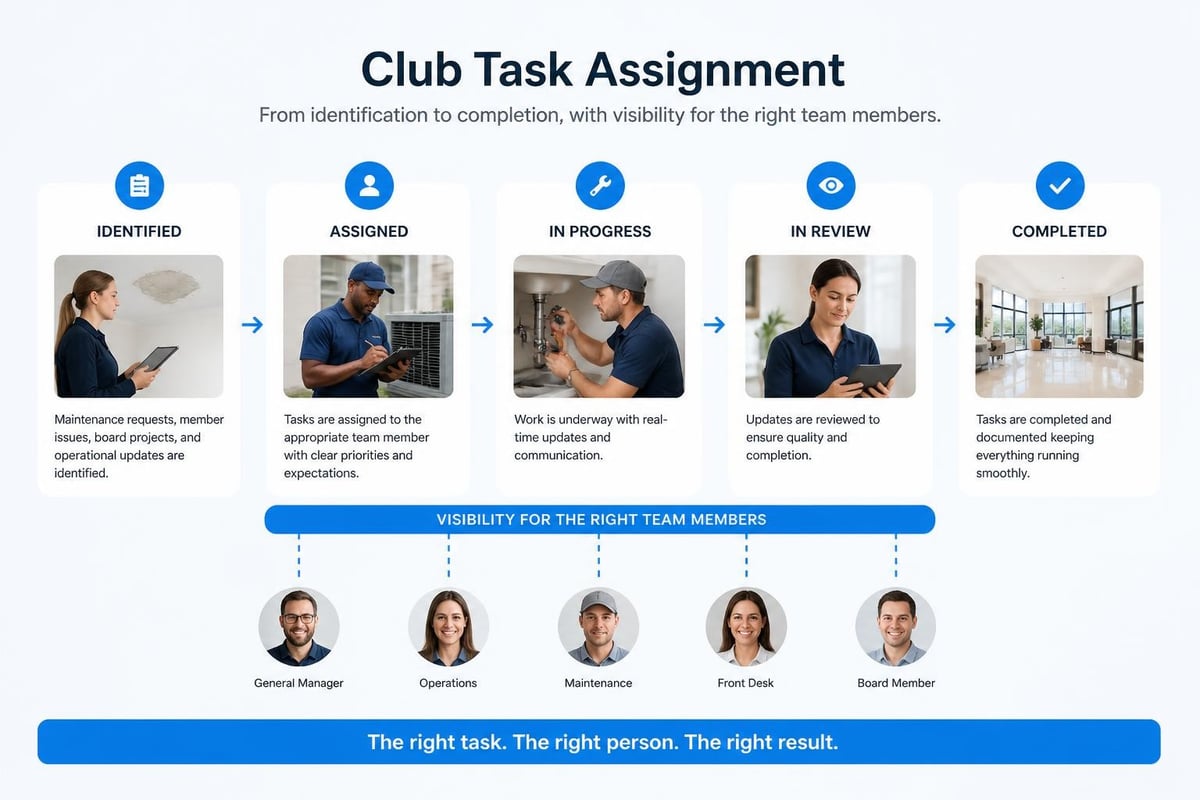
The best part? Tasks live in the same system as your member data. When someone reports a problem with their membership, you can create a task right there. When a coach needs additional equipment ordered, it becomes a trackable task instead of a forgotten conversation.
The Knowledge Transfer Gap
Your experienced front desk person has worked every summer for five years. She knows every quirk of your membership policies, remembers families by name, and handles unusual situations smoothly.
Then she graduates college and moves across the country.
Now you're training someone new and realizing that most of her knowledge lived in her head. Your training manual is outdated. The new person keeps interrupting members' time to ask questions. Simple tasks take three times longer.
This knowledge transfer problem hits every club eventually. Staff turnover is normal. The question is whether your team management software helps preserve institutional knowledge or forces you to start from scratch each season.
Building Knowledge Into the System
Smart clubs use their software to capture knowledge over time:
- Notes templates for common situations
- Documented processes for complex tasks
- Member history that shows past interactions
- FAQ sections built into the system
When effective team managers focus on development and structured feedback , they create systems that help new team members get up to speed faster. Your software should be part of that system.
For example: Instead of hoping new staff remember the guest policy, the system can display it automatically when someone tries to check in a guest. Instead of explaining billing cycles verbally, the software can show upcoming charges when members ask. Instead of training people on waiver requirements, the check-in process can block entry until waivers are current.
This isn't about replacing human judgment. It's about reducing the cognitive load on seasonal staff so they can focus on member service instead of policy memorization.
Choosing Software That Helps Your Team
Not all team management software is created equal. Some systems are built for enterprise corporations with dedicated IT departments. Others are generic tools that require extensive customization to work for membership-based facilities.
What you actually need is software designed for how swim clubs, tennis clubs, and HOA pools operate:
- Seasonal staffing patterns with high turnover
- Volunteer board members who need access without training
- Part-time front desk coverage across different shifts
- Multiple user roles with appropriate permissions
- Simple workflows that don't require constant support
When evaluating options, test them with real scenarios from your club. Can a new volunteer figure out how to check someone in without calling you? Can a board member pull membership numbers without a tutorial? Can your head coach update roster information independently?
The Integration Question
Here's something most clubs don't consider until it's too late: how does your team management software connect to everything else you use?
Your website, your payment processor, your email system, your accounting software. If these pieces don't talk to each other, you're creating more work for your team, not less.
Look for platforms that offer:
- Website integration so members can update their own information
- Payment processing built into the membership workflow
- Email capabilities that use your actual member data
- Reporting tools that export to standard formats
A unified platform eliminates the need to enter data multiple places. When a member updates their emergency contact through your website, it should automatically update in your main system. When someone pays their bill, your front desk should see it immediately.
The Team Software Process emphasizes structured approaches that help teams work more effectively. Your software integration is part of that structure.

The Real Cost of Bad Team Software
Let's talk about what poor team management software actually costs your club beyond the subscription fee.
Manager time: How many hours per week does your manager spend answering questions that the software should answer? Pulling reports that should be automatic? Fixing mistakes that the system should prevent? At 5 hours per week and a manager salary of $20/hour, that's $5,200 per year in wasted time.
Staff frustration: When your front desk people spend more time fighting with software than helping members, they burn out faster. Higher turnover means more training, more mistakes, and worse member experience.
Member experience: Inconsistent service frustrates members. When staff can't quickly look up account history or answer basic questions, members notice. Poor retention costs far more than any software subscription.
Board confidence: When board members can't easily access the information they need to make decisions, they either micromanage operations or make uninformed choices. Neither is good.
Consider the structured approach to team management that includes clear cadence, decision-making processes, and measurement. Your software should support this structure, not fight against it.
Getting Your Team On Board
You've found better team management software. Great. Now you need to get everyone using it.
This is where many clubs fail. They buy the software, announce it in an email, and wonder why adoption is slow. People resist change, especially when they've developed workarounds for the old system.
The Transition Process
Start with your power users. Get your most tech-comfortable staff using the system first. They'll find the issues, learn the shortcuts, and become your internal champions.
Focus on one pain point. Don't try to migrate everything at once. Pick your biggest team management headache and solve it first. Maybe that's scheduling. Maybe it's member check-in. Maybe it's billing questions. Solve one problem well, then expand.
Make it easier than the old way. If your new system requires more clicks or more steps than the old system, people won't use it. The software should save time immediately, even if they don't know all its features.
Create simple guides. Not a 50-page manual. One-page quick references for common tasks. Screenshots showing exactly where to click. Video walkthroughs under three minutes.
Training seasonal staff is always a challenge. The easier your onboarding process , the faster new team members become productive.
Mobile Access Matters More Than You Think
Most team management problems happen away from the office computer. Your head coach is on deck and needs to check lesson enrollment. Your maintenance person is at the pool and needs to verify that a work order was submitted. A board member is traveling and needs to review finances before tomorrow's vote.
Mobile access isn't a nice-to-have feature anymore. It's essential for team coordination.
Real scenarios that require mobile:
- Front desk volunteer checking member status from the gate
- Manager approving a refund request while at their kid's soccer game
- Coach updating attendance immediately after practice
- Board member reviewing reports during their commute
The best team management software works just as well on phones as on computers. Not a stripped-down mobile version. Full functionality in a mobile-friendly format.
Security and Access Control
Here's something clubs often overlook until there's a problem: who can see what information?
Your front desk volunteers need to process check-ins, but they shouldn't access financial reports. Board members need to see high-level metrics, but they don't need individual member payment details. Your maintenance contractor needs task assignments, but not member contact information.
Good team management software includes role-based permissions:
| Role | Typical Access |
|---|---|
| Front Desk | Check-ins, member lookup, guest registration |
| Manager | Everything |
| Board Member | Reports, membership trends, financial summaries |
| Coach | Rosters, attendance, lesson information |
| Maintenance | Work orders, facility notes, task assignments |
This isn't about trust. It's about reducing liability and protecting member privacy. When someone inevitably asks "who can see my payment information?" you should have a clear answer.
Your security practices matter more as you centralize team access to member data. Make sure your software provider takes this seriously.
The AI Question
You've probably noticed AI showing up in every software product lately. Some of it is useful. Most of it is marketing hype.
For team management software in swim clubs, AI can actually help with specific problems:
Predicting staffing needs: Based on historical attendance patterns, the system might suggest when you need additional coverage. Not rocket science, but helpful for planning.
Identifying at-risk members: AI can flag members who haven't checked in recently or whose usage patterns have changed, helping your team reach out proactively.
Automating routine communications: Smart templates that personalize messages based on member data, saving your team from writing the same email 47 times.
Answering common questions: AI-powered help that staff can consult for policy questions without interrupting you.
The key is that AI should help your team work better, not replace human judgment. When technology providers are transparent about how they use AI , you can make informed decisions about what actually benefits your operations.
Testing New Software Before Committing
Before you switch your entire operation to new team management software, test it properly. Many clubs skip this step and regret it.
Run a pilot program with a subset of your team. Maybe just the front desk for two weeks. Maybe just one coach's lesson groups. This lets you identify problems before they affect everyone.
Track specific metrics:
- How long does check-in take compared to the old system?
- How many support questions does staff ask per day?
- What tasks that used to require manager involvement can staff now handle independently?
- How many fewer "where do I find this?" questions come up?
A proper pilot program should reveal both the benefits and the rough edges. No software is perfect. The question is whether the problems are fixable and the benefits are real.
Get feedback from actual users. Not just managers. Ask your front desk volunteers what they think. Ask coaches if it helps them. Ask board members if they can find the information they need.
The goal isn't to find perfect software. The goal is to find software that makes your team's daily work easier and more consistent.
When to Upgrade Your Current System
Maybe you're reading this and thinking your current setup works fine. You've got spreadsheets, a scheduling tool, and a payment processor. Everyone knows where things are.
Here are signs it's time to consider integrated team management software:
- You spend more than 5 hours per week answering questions that should be self-service
- Staff turnover means starting from scratch with training every season
- Board members regularly ask for information you can't easily provide
- You're using 4+ different tools that don't connect to each other
- Member complaints about inconsistent service are increasing
- You've grown beyond 200 members and manual tracking is breaking down
Growth amplifies coordination problems. What worked when you had 100 members and 3 staff doesn't scale to 300 members and 10 staff across multiple shifts.
The right time to upgrade is before the pain becomes crisis-level. When you're planning for next season, not scrambling to fix problems mid-summer.
Making the Business Case
If you need board approval for new software, focus on outcomes rather than features.
Don't say: "This software has 47 features including automated billing, mobile check-in, and reporting dashboards."
Do say: "This software will reduce the manager's administrative time by 6 hours per week, eliminate billing errors that cost us roughly $1,200 last year, and give the board real-time access to membership metrics without requiring manager reports."
Build a simple comparison showing:
- Current costs (including hidden costs like manager time)
- Expected costs with new software
- Measurable improvements (time saved, errors reduced, member satisfaction)
- Implementation timeline and training needs
Make it easy for board members to say yes by showing clear return on investment. If you need help building this case, resources like making your case for new software can provide frameworks specific to membership facilities.
Team management software should fade into the background of your daily operations. When it works well, you barely notice it. Your staff gets what they need, your board stays informed, your members receive consistent service, and you spend less time coordinating and more time improving your club. If you're ready to simplify how your team works together and eliminate the coordination chaos that comes with seasonal staffing, PoolPulse offers a modern, configurable platform built specifically for swim clubs, tennis clubs, and member-driven facilities. The difference is in how quickly your team can start saving time instead of learning another complicated system.

Five Front-Desk Tasks Your Swim POS Should Handle
Your front desk shouldn't need three systems to check in a swimmer. Here's how modern swim POS systems save time and reduce errors.

When Your Check-In Line Proves Software Is Too Slow
Discover how software timing affects your swim club's daily operations, from check-ins to billing, and why faster response times mean happier members.

The Swim Club Software Test Every Board Should Run
Run this simple test to see if your swim club software actually saves time or creates more work. Real scenarios, honest questions, better tools.
Want to see if PoolPulse is a good fit for your club?
Book a walkthrough and we'll show you exactly how PoolPulse can help based on your club's needs, goals, and current processes.