

The $500 Monthly Mistake Most Swim Clubs Are Making
Hidden billing errors cost swim clubs hundreds monthly. Learn how billing automation software catches mistakes, saves time, and recovers lost revenue.


Picture this: It's the third week of June, your busiest time of year. You've got a line of families waiting to check in, the phone won't stop ringing with questions about guest passes, and you just realized that the Jenkins family has been swimming all season without paying their April invoice. Again. When you finally sit down to investigate, you discover they're not alone. There are twelve other families with outstanding balances you didn't catch. That's real money walking out your gate every single day.
This scenario plays out at swim clubs across the country every summer. The culprit? Manual billing processes that can't keep up with the pace of a busy season. But here's the good news: you don't have to live with these losses anymore.
Why Manual Billing Creates Hidden Revenue Leaks
You probably already know your current billing system has problems. What you might not realize is just how much money those problems actually cost you.
Let's break down what happens in a typical month at a club using spreadsheets or basic software:
- Missed renewals happen because someone forgets to check who's up for renewal
- Pro-rated charges get calculated wrong when staff rushes through calculations
- Family accounts get duplicated when different family members sign up separately
- Late fees never get applied because tracking due dates manually is overwhelming
- Payment plans fall through the cracks when you're juggling too many member requests
Each of these errors might seem small on its own. But add them up across 200 or 300 member families, and you're looking at serious money. Most clubs we talk to discover they're losing between $300 and $800 monthly just from billing mistakes they never caught.
The Saturday Morning Reality Check
Here's a test you can run right now. Pull up your member list and ask yourself these questions:
- Can you instantly see which families have overdue balances?
- Do you know which memberships expire in the next 30 days?
- Can you tell if the Wilson family has paid for their swim team registration?
- Do you have a record of every payment attempt, including the ones that failed?
If you answered "no" to any of these, you're working too hard for too little return. And your front desk staff is probably spending hours every week trying to track down answers to these exact questions.

What Billing Automation Software Actually Does
Let's cut through the jargon. Billing automation software handles the repetitive billing tasks that eat up your staff's time and create opportunities for costly mistakes.
Think of it this way: instead of Sarah spending two hours every Monday morning sending invoice emails and updating your spreadsheet, the system does it automatically. Instead of you manually calculating what to charge a family who joins on June 15th, the software figures out the pro-rated amount instantly. Instead of hoping you remember to charge late fees, they get applied automatically on day 31.
The Four Core Functions That Matter Most
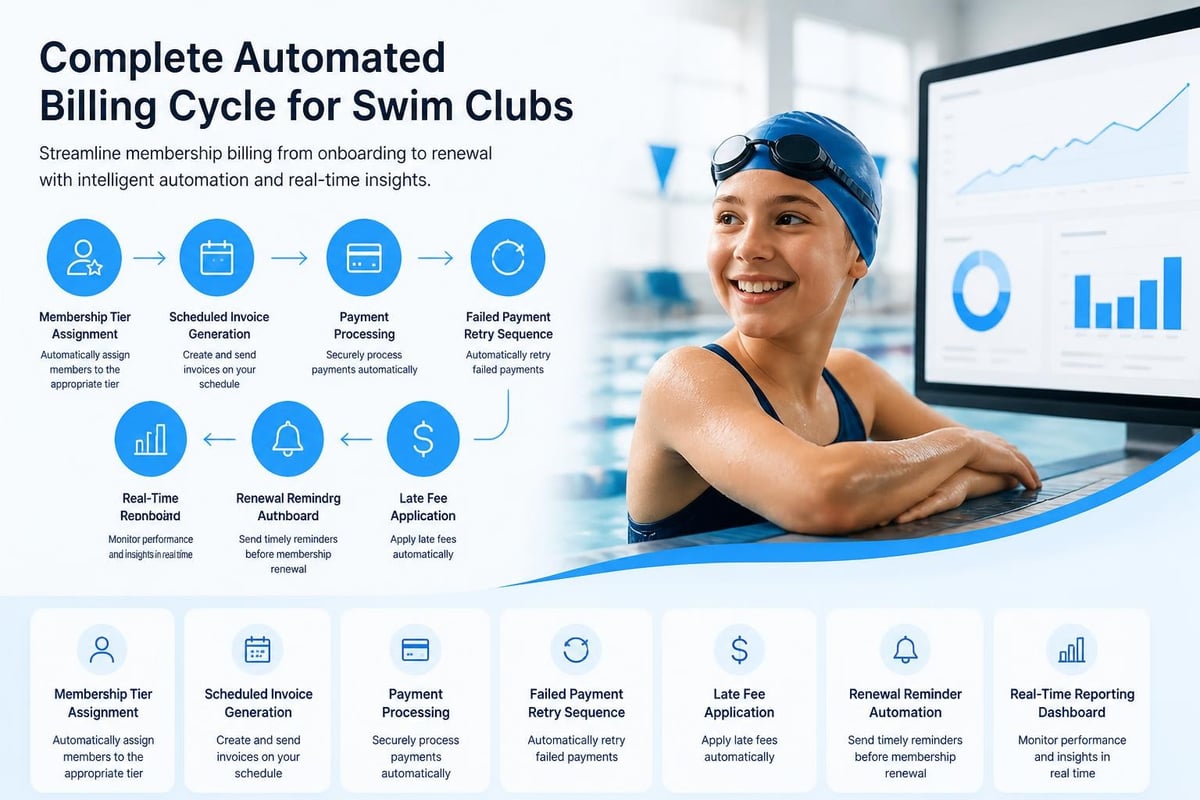
Automated invoice generation means the system creates and sends invoices on schedule without human intervention. When the Henderson family's monthly dues are due on the 5th, they get their invoice on the 5th. Every single month. No exceptions.
Payment processing and reconciliation handles the actual collection of money and matches payments to the correct accounts. When someone pays, their balance updates immediately. When a credit card gets declined, you know about it right away instead of discovering it weeks later.
Renewal management tracks membership end dates and triggers renewal notices automatically. The system knows that 47 memberships expire in August and starts sending reminders in June. You don't have to remember. You don't have to check a list.
Revenue reporting gives you real-time visibility into your financial picture. You can see exactly how much money you've collected this month, what's still outstanding, and which families need follow-up. No more waiting until month-end to discover problems.
The best billing and invoicing software today handles all of these functions while integrating with your existing payment processors and accounting systems.
Setting Up Automation That Actually Works
The biggest mistake clubs make when implementing billing automation software is trying to automate their current mess. If your billing processes are confused now, automating them just means you'll have confused processes that run automatically.
Start by cleaning up your foundation first.
Step One: Get Your Member Data Organized
Before you automate anything, you need accurate member information. That means:
- Consolidating duplicate accounts
- Verifying email addresses and phone numbers
- Confirming which membership tier each family belongs to
- Recording any special arrangements or payment plans
- Documenting who owes what
This cleanup work isn't glamorous, but it's essential. Think of it like cleaning your pool before adding chemicals. You need to see what you're working with first.
Step Two: Standardize Your Billing Rules
Write down your actual billing policies. Not what you think they should be, but what you actually do.
| Billing Component | Current Rule | Exception Handling |
|---|---|---|
| Monthly dues | Charged 1st of month | Pro-rate for mid-month starts |
| Late fees | $25 after 30 days | Waived for autopay failures |
| Family discounts | 10% for 2+ kids | Applied at registration |
| Seasonal pricing | Higher Jun-Aug | Set in January each year |
According to best practices in billing automation , addressing these process inconsistencies before automation prevents costly rework later.
Once you document everything, you'll probably find inconsistencies. Maybe you charge late fees sometimes but not others. Maybe your summer pricing isn't actually consistent. Fix these issues now, while you're still working manually. The right swim club management software will then enforce these rules consistently.
Step Three: Choose Software That Fits How You Actually Work
Don't fall for the trap of buying software based on feature lists. Instead, think about your actual daily workflow.
Ask yourself: What takes the most time right now? For most clubs, it's one of these scenarios:
- Answering "Did I pay my bill?" questions at the front desk
- Tracking down families with overdue balances
- Calculating charges for families who join mid-season
- Managing the chaos of renewal season
- Reconciling what you billed versus what actually got paid
Find software that solves your specific pain points. A system with 500 features you'll never use isn't better than one with 50 features you'll use daily.
How Automation Changes Your Daily Operations
Let's walk through what a typical week looks like before and after implementing billing automation software.
Monday morning before automation: Sarah arrives at 8 AM and spends until 10:30 AM creating invoices in Excel, copying them into email templates, and sending them individually. She makes three calculation errors that she won't discover until families call to complain.
Monday morning after automation: Sarah arrives at 8 AM to find that all invoices were generated and sent overnight. She spends 15 minutes reviewing a dashboard that shows her exactly which payments processed successfully and which need follow-up.
That's two hours saved. Every single week.
Wednesday afternoon before automation: A parent calls asking why they were charged $180 when they thought their monthly fee was $150. Sarah has to dig through files, check the signup form, calculate the additional swim team fee, and call them back. Total time: 25 minutes. She handles six of these calls today.
Wednesday afternoon after automation: A parent calls with the same question. Sarah opens their account, sees their complete billing history and itemized current charges, and explains everything in two minutes while the parent is still on the phone.
The Front Desk Gets Easier
Your front desk staff shouldn't need to be billing experts. But when you're running manual processes, they have to remember:
- Which families are on payment plans
- Who gets charged what amount
- Which accounts have holds or special notes
- Who needs to update their payment method
With billing automation software, all of this information is right there in the member's account. Anyone working the desk can see the full picture instantly. This is especially valuable when you're working with seasonal staff who might only be with you for a few months.
The features that matter most are the ones that answer questions quickly and prevent your team from having to "check on that and get back to you."
Solving the Problems You're Probably Facing Right Now
Let's talk about the issues that keep club administrators up at night.
The Renewal Season Nightmare
Every year, the same thing happens. Renewals are due, and you send out notices, but response is slow. You send reminders. Some families renew. Others don't respond. You can't tell who's planning to come back and who's quietly decided not to renew.
Two weeks before the season opens, you still don't know if you'll have 180 members or 250 members. You can't plan staffing. You can't order supplies. You're flying blind.
Billing automation software changes this completely by creating an automated renewal workflow:
- 90 days out: First renewal notice with early-bird discount
- 60 days out: Second notice, discount still available
- 45 days out: Reminder, discount expires soon
- 30 days out: Final notice at regular price
- Real-time dashboard: Shows you exactly who's renewed and who hasn't
You're no longer guessing. You know your numbers weeks in advance.
The Failed Payment Problem
Credit cards expire. Banks flag transactions. Accounts run out of money. Payment failures are inevitable.
The question is: how long does it take you to find out and fix the problem?
In a manual system, you might not know a payment failed until you reconcile your accounts at month-end. That family has been swimming for three weeks on an unpaid membership. Now you have to have an awkward conversation and collect a month's worth of back dues.
According to enterprise billing automation best practices , automated retry logic and immediate notification prevent these scenarios entirely.
Your billing automation software should:
- Attempt to reprocess failed payments automatically
- Send immediate notification to the member
- Flag the account for your staff if payment continues to fail
- Apply holds or restrictions based on your policies
All of this happens without you having to remember to check anything.
The "Special Situation" Challenge
Every club has members with unique arrangements. The board president pays quarterly instead of monthly. The Johnson family has a payment plan because they're paying off a pool refund bond. The Martinez family gets a 20% discount because they volunteer for weekend maintenance.
These special cases are where manual billing falls apart. You can't remember everyone's unique situation, and your spreadsheet can't handle the complexity.
Good billing automation software lets you set up rules for individual accounts. Once you configure it, the system remembers forever. The board president automatically gets quarterly invoices. The Johnsons automatically get charged their payment plan amount on the 15th. The Martinez discount applies automatically to every invoice.
You set it up once. It works correctly forever.
Measuring What Actually Improves
You need to know if this is actually working. Here's what to track:
Time savings is the most obvious metric. Count the hours your staff spends on billing tasks before and after automation. Most clubs cut billing admin time by 60-75%.
Collection rate measures what percentage of billed amounts you actually collect. If you're currently collecting 92% and you jump to 97% after automation, that's significant money on a $200,000 annual billing base.
Average days to payment tracks how long it takes families to pay after you send an invoice. Automation typically shortens this because invoices arrive consistently and members can pay online instantly.
| Metric | Before Automation | After Automation | Impact |
|---|---|---|---|
| Hours on billing/week | 12-15 hours | 3-4 hours | 70% reduction |
| Collection rate | 91% | 96% | $10K annual increase |
| Avg days to payment | 18 days | 8 days | Better cash flow |
| Billing errors/month | 8-12 | 0-1 | Fewer disputes |
Error rate is equally important. How many billing mistakes happen each month? How many "I was charged wrong" conversations do you have? Track this before and after. The implementation guide for automated billing emphasizes that error reduction is often where clubs see the most dramatic improvement.
Common Mistakes to Avoid
We've seen clubs stumble in predictable ways when implementing billing automation software. Learn from their mistakes.
Mistake One: Automating Without Testing
You can't just flip a switch and hope everything works. You need to run parallel systems for at least one billing cycle.
Generate your invoices the old way and the new way. Compare them line by line. Find discrepancies. Fix configuration issues. Only when you've had a full cycle with zero errors should you shut down the manual process.
Mistake Two: Not Training Your Team
Your staff needs to understand what the system is doing and why. They'll get questions from members. They need to be able to explain how the new billing works.
Run training sessions before you go live. Create simple reference guides. Make sure everyone knows how to look up accounts, explain charges, and handle common questions.
Mistake Three: Forgetting to Communicate With Members
Your members will notice when their invoices suddenly look different or arrive at different times. Get ahead of this.
Send an email explaining that you're upgrading to better billing software. Highlight the benefits for them: easier online payment, clearer invoices, faster responses to their questions.
According to automated billing best practices , clear communication prevents confusion and reduces support questions during the transition.
Mistake Four: Choosing Software That Doesn't Integrate
Your billing system needs to talk to your other systems. If your billing software can't connect to your payment processor, your accounting software, or your member database, you'll end up doing manual data entry anyway.
Ask about integrations before you buy. Make sure the software works with the tools you already use. The swim club member management software you choose should unify these functions rather than creating new silos.
Making the Business Case to Your Board
You see the value of billing automation software. Now you need to convince your board to approve the budget.
Build Your ROI Argument
Start with hard numbers. Calculate what billing mistakes cost you annually. Add up the staff hours spent on manual billing tasks and multiply by your hourly cost. Include the opportunity cost of staff who could be doing higher-value work instead of chasing down billing issues.
Here's a sample calculation for a 250-member club:
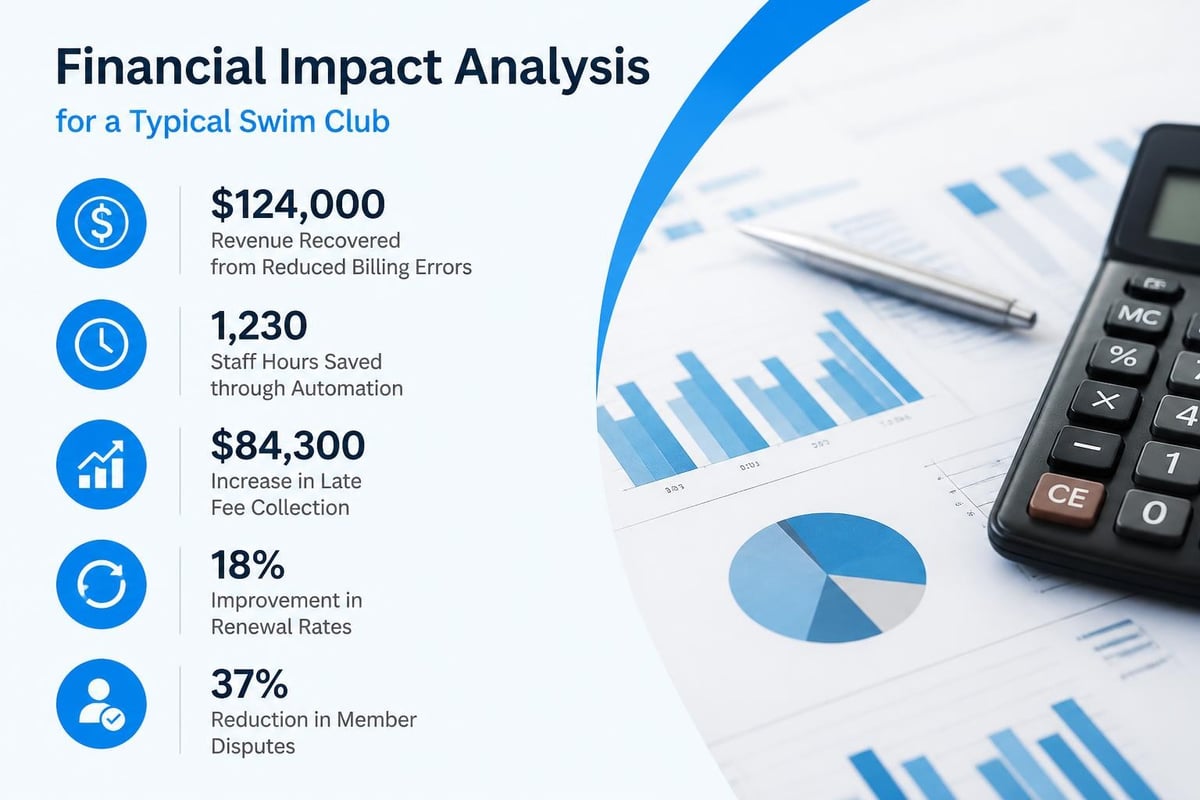
- Revenue recovered from better collections: $8,000/year
- Staff time saved (10 hrs/week at $25/hr): $13,000/year
- Late fee revenue previously uncollected: $2,400/year
- Prevented errors and disputes: $1,500/year
- Total annual benefit: $24,900
Now compare that to your software cost. Even if you're paying $3,600 annually for software, you're still ahead by $21,300. That's an ROI of 591%.
Address the "We've Always Done It This Way" Objection
Some board members will resist change. They'll say the current system works fine, or that the cost isn't justified, or that it seems too complicated.
Bring data to counter these objections:
- Show them the list of billing errors from the past six months
- Demonstrate how long it takes to answer a simple billing question now
- Walk them through the renewal chaos you deal with every spring
- Explain how much time your administrator could save
Better yet, show them a demo. Let them see how easy it actually is. Most resistance melts away when people see the software in action.
What Modern Billing Systems Can Handle
The capabilities of billing automation software have evolved dramatically. Systems built in 2026 can handle scenarios that would have required custom development just a few years ago.
Dynamic Pricing and Seasonal Adjustments
You can set up rules that automatically adjust pricing based on when someone joins, which tier they select, how many family members they have, and what add-ons they choose.
A family joining your club on July 1st gets automatically charged the pro-rated amount for a half-summer membership. No calculation needed. No possibility of error.
Automated Communication Sequences
The system can send targeted messages based on specific triggers:
- Welcome email when someone joins
- Reminder three days before auto-payment processes
- Thank you note after successful payment
- Friendly follow-up when payment fails
- Renewal invitation 90 days before expiration
You write these messages once and the system sends them to the right people at the right time.
Complex Family and Group Billing
Modern systems understand relationships. They know that the Thompson family has three members, that Dad is the primary contact for billing, that Mom should get check-in notifications, and that their teen daughter can use her own login for guest reservations.
You can bill families as a unit or split charges. You can handle corporate memberships with multiple employees. You can manage situations where one membership covers multiple households.
Revenue Recognition and Reporting
For clubs that need to track revenue in specific ways, whether for tax purposes, board reporting, or grant compliance, automated systems can categorize and report revenue by type, date range, membership tier, or any other dimension you need.
The swim club software migration checklist can help you identify which specific billing capabilities matter most for your situation.
Integration With Member Experience
Billing doesn't exist in isolation. It's connected to every other part of how you run your club.
The Check-In Connection
When the Garcia family arrives at the pool, your staff swipes their membership card. The system instantly shows whether their account is current or if there's an outstanding balance. This real-time connection between billing and access control prevents the awkward situation where someone's been swimming all month on an expired membership.
The Registration Link
When someone registers for swim team or signs up for lessons, the charges automatically appear on their account. No separate invoicing system. No risk of forgetting to bill them. No duplicate data entry.
The Website Integration
Members should be able to log into their account on your website, see their billing history, update their payment method, and pay outstanding balances. This self-service capability reduces phone calls and emails dramatically.
The website integration capabilities of modern swim club platforms make this seamless rather than requiring custom development.
Planning Your Implementation Timeline
Switching to billing automation software isn't something you do on a random Tuesday in July. You need to plan it carefully.
Off-season is ideal because you have time to set everything up, test thoroughly, and train staff without the pressure of peak season operations. If your busy months are June through August, start your implementation project in September or October.
Allow 60-90 days for a proper rollout:
- Weeks 1-2: Evaluate options, select software, sign contract
- Weeks 3-4: Clean up existing member data
- Weeks 5-6: Configure the system with your billing rules
- Weeks 7-8: Import data and test extensively
- Weeks 9-10: Train staff and prepare member communications
- Week 11: Run parallel billing cycle
- Week 12: Go live and monitor closely
Don't rush this. The clubs that struggle are the ones that try to implement new software in two weeks right before opening day. Give yourself enough time to do it right.
The AI-Powered Billing Advantage
The newest development in billing automation software is the integration of artificial intelligence. This isn't science fiction. It's practical capability that solves real problems.
Pattern Recognition for Revenue Recovery
AI can analyze your billing data to identify patterns you'd never spot manually. It might notice that families who pay late in May are 73% likely to have problems in June, allowing you to proactively reach out. Or it might flag that your swim team registrations are running 20% behind last year's pace at this point.
These insights help you make better decisions and catch problems before they become crises.
Predictive Analysis for Cash Flow
Instead of waiting until month-end to know your financial position, AI-powered systems can predict with high accuracy what your collections will look like based on current payment patterns, historical data, and upcoming due dates.
This helps with everything from staffing decisions to capital project planning.
Intelligent Exception Handling
When unusual situations arise, AI can suggest how to handle them based on how you've handled similar cases in the past. It learns your preferences and helps ensure consistency.
The AI insights demo shows how this works in practice for swim club operations.
Security and Compliance Considerations
You're handling sensitive financial information. Your billing automation software needs to protect that data properly.
Payment Card Industry (PCI) Compliance
If you're processing credit cards, you need to be PCI compliant. The good news is that modern billing automation software handles most of this for you. The payment information never touches your servers. Members enter card details directly into the payment processor's secure form.
Make sure any software you're considering is PCI compliant and keeps you compliant by design.
Data Privacy and Protection
Member billing data is private. Your system should include:
- Encryption for data at rest and in transit
- Role-based access controls so staff only see what they need to see
- Audit logs showing who accessed what information and when
- Secure password policies and multi-factor authentication options
Backup and Disaster Recovery
What happens if the software company's servers fail? How quickly can your data be restored? What's your contingency plan?
Cloud-based systems typically offer better reliability and backup than on-premise solutions. Make sure you understand the service level agreement and disaster recovery procedures.
Real-World Results From Clubs Like Yours
Numbers and features are helpful, but sometimes you just want to hear from other club administrators who've been where you are.
A 180-member community pool in suburban Chicago implemented billing automation software in November 2024. By the following summer, they had reduced billing-related calls by 68%. Their administrator reported saving approximately 8 hours per week on billing tasks. They collected 95% of dues within 30 days compared to 84% the previous year. That improvement alone paid for the software three times over.
A 300-member swim and tennis club in North Carolina struggled with renewal season every year. After implementing automated renewal workflows, their renewal rate increased from 82% to 91%. They credited the improvement to consistent, timely reminders and the convenience of online renewal. The additional 27 member families represented over $40,000 in annual revenue that would have otherwise walked away.
A small 85-member HOA pool was spending approximately $1,200 monthly on bookkeeping services to handle billing reconciliation. After implementing billing automation software with proper accounting integration, they reduced bookkeeping costs to $400 monthly because their bookkeeper only needed to verify and approve rather than manually entering everything.
These aren't unusual results. They're typical of what happens when clubs move from manual processes to proper automation.
Billing automation software isn't just about saving time, though that alone would justify it. It's about running a more professional operation, avoiding costly mistakes, and giving your members a better experience. When billing works smoothly in the background, you can focus on what actually matters: creating a great place for families to swim, building community, and enjoying your summer instead of drowning in spreadsheets. PoolPulse brings modern, AI-powered billing automation to swim clubs, tennis clubs, and HOA pools through a highly configurable platform designed specifically for member-driven facilities. If you're ready to stop losing money to billing errors and free up your team to do more valuable work, schedule a demo to see how automation can transform your operations.

What Your Billing and Invoices Are Telling You
Your swim club's billing and invoices reveal hidden patterns about late payments, refund requests, and cash flow. Here's how to read the signals.

The Swim Club Software Test Every Board Should Run
Run this simple test to see if your swim club software actually saves time or creates more work. Real scenarios, honest questions, better tools.

The Seven Signs You've Outgrown Your Club Operations
Your swim club is growing, but your tools aren't keeping up. These seven warning signs reveal when manual processes cost more than solutions.
Want to see if PoolPulse is a good fit for your club?
Book a walkthrough and we'll show you exactly how PoolPulse can help based on your club's needs, goals, and current processes.