

POS and Invoices for Swim Clubs: A Simple Guide
Learn how POS and invoices work together for swim clubs. Practical tips on billing, tracking, and reducing payment headaches.


Running a swim club means juggling a lot of moving parts. Between managing memberships, scheduling lessons, and keeping the facility running smoothly, you're constantly dealing with money flowing in and out. That's where understanding pos and invoices becomes essential. Whether you're selling snacks at the concession stand, charging for swim lessons, or billing annual dues, you need a system that keeps track of every transaction without creating extra work. Let me walk you through how these two pieces fit together and why getting them right can save you hours every week.
What POS and Invoices Actually Mean for Your Club
You've probably heard the term POS thrown around, but what does it actually mean in your day-to-day operations? A point of sale system is simply where money changes hands. At your swim club, that might be the front desk where members check in and buy guest passes, the snack bar where kids grab candy after practice, or even a tablet you use poolside to sign up families for lessons.
Invoices, on the other hand, are your paper trail. They're the detailed records you send to members showing what they owe, when payment is due, and what they're paying for. Think of your annual membership renewals, monthly installment plans, or those extra charges when a family books a private party at the pool.
How They Work Together
Here's where it gets interesting. Your pos and invoices aren't separate systems that live in different worlds. They're connected pieces of your financial puzzle.
When a parent buys a swim cap at your front desk, your POS records that sale instantly. When you bill that same family for their quarterly dues, you're creating an invoice. Both transactions need to end up in the same place so you can see the full financial picture of each member's account.
The problem I see at most clubs? These systems don't talk to each other. You've got one spreadsheet for POS sales, another for invoices, maybe a third for tracking who's paid what. That's a recipe for mistakes and missing money.
Common Scenarios Where POS and Invoices Overlap
Let me paint a picture of how this plays out in real life. Say the Martinez family has been members at your club for three years. In a typical month, here's what might hit their account:
- Their monthly membership installment (invoice)
- Three guest passes they bought for visiting relatives (POS)
- Registration fee for their daughter's stroke clinic (invoice)
- Snacks and drinks from the concession stand (POS)
- A late fee because they missed last month's payment deadline (invoice)
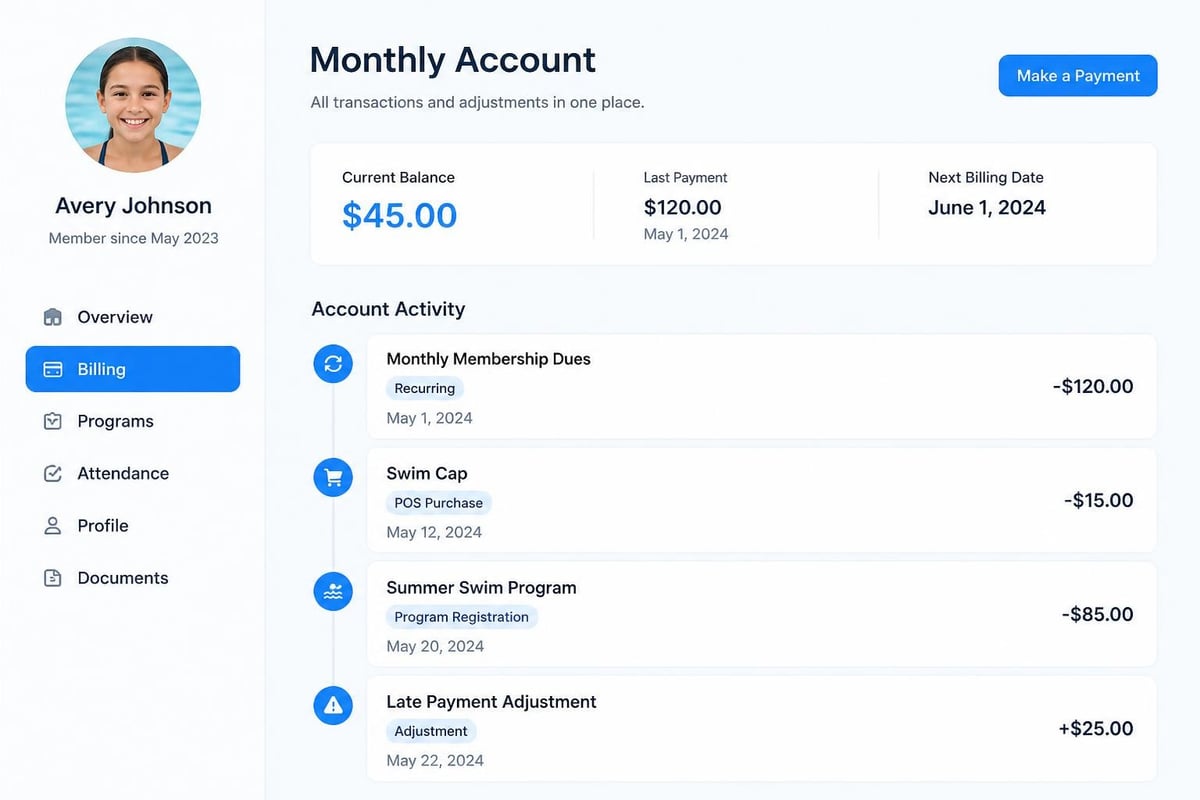
Each of these transactions tells part of the story. But if you can't see them all in one place, you're missing things. Maybe the Martinezes actually overpaid when you factor in a credit from last month. Maybe they think they're current, but you show them owing money. These disconnects create awkward conversations and erode trust.
The Payment Confusion Problem
Here's another headache I hear about constantly. A member walks up to your desk and asks, "Am I paid up?" Sounds like a simple question, right?
But if your pos and invoices live in different systems, you're suddenly scrambling. You check one system for their membership status, another for outstanding invoices, maybe a third notebook where someone wrote down that cash payment they made last week. You end up telling the member, "Let me get back to you on that."
That's embarrassing. And it wastes time you could spend on actually running the club.
Setting Up Your POS System for Club Operations
Your POS needs are probably simpler than you think. You don't need the fancy setup that a retail store uses. What you do need is a system that handles the specific situations that come up at a swim club.
What your POS should track:
- Daily admissions and guest passes
- Concession stand sales
- Equipment rentals (kickboards, goggles, whatever you loan out)
- Program sign-ups that happen in person
- Merchandise sales (team suits, club gear)
- Facility rental fees
The key is making sure whoever's working the desk can process these transactions quickly. Parents are impatient when they're trying to drop off kids for practice. You need speed and accuracy.
Choosing the Right Payment Methods
Cash is dying, and that's actually good news for your record-keeping. Every cash transaction is a chance for money to disappear or get recorded wrong.
Here's what I recommend accepting in 2026:
- Credit and debit cards (your bread and butter)
- Digital wallets like Apple Pay and Google Pay (faster than cards)
- ACH transfers for larger invoices
- Cash as a backup only
When you're evaluating POS options, compliance and regulations for point-of-sale systems become important. You're handling member payment data, which means you need to protect it properly. Look for systems that mention PCI compliance, that's the security standard for processing card payments.
Creating Invoices That Actually Get Paid
I've seen some truly awful invoices over the years. Vague line items, no due dates, missing contact info, and worst of all, no clear instructions on how to actually pay.
Your invoices need to answer these questions immediately:
- What am I being charged for?
- How much do I owe?
- When is this due?
- How do I pay?
- Who do I contact if I have questions?
Invoice Structure That Works
Following invoice formatting best practices isn't about being fancy. It's about getting paid faster and fielding fewer confused emails.
| Invoice Element | What to Include | Why It Matters |
|---|---|---|
| Header | Club name, logo, contact info | Looks professional, easy to reach you |
| Invoice number | Unique identifier (INV-2026-001234) | Track payments, reference in conversations |
| Date issued | When you sent it | Starts the payment timeline |
| Due date | Specific date, not "Net 30" | Creates urgency, clear deadline |
| Member details | Name, membership number, email | Confirms who owes what |
| Line items | Clear descriptions, quantities, rates | No confusion about charges |
| Total | Broken down by subtotal, tax, total due | Shows your math |
| Payment options | Methods accepted, where to pay | Removes friction |
Following essential invoicing best practices means you're less likely to chase people down later. When members understand exactly what they owe and can pay easily, your collection rate goes up.
Automating the Connection Between POS and Invoices
Here's where modern swim club management software makes your life dramatically easier. Instead of manually reconciling POS transactions with invoiced charges, everything flows into the same member account automatically.
Think about your current process. Someone buys something at the desk. You (or a volunteer) writes it down or enters it somewhere. Later, you manually add that to their account balance. Then you create an invoice that may or may not reflect all those little charges. It's tedious and error-prone.
What automation looks like:
When a transaction happens at your POS, it instantly posts to that member's account. When you generate their monthly invoice, all those charges are already there. When they make a payment, it applies to their balance immediately. Everyone sees the same numbers at the same time.

Real-Time Balance Updates
Here's a scenario that probably sounds familiar. A member pays their invoice online on Monday morning. They show up Monday afternoon and ask about their account status. Your volunteer at the desk is looking at a printed report from Sunday night and says they still owe money. Cue the frustrated member pulling up their bank statement on their phone to prove they paid.
When your pos and invoices operate in real-time, this doesn't happen. Payment posts immediately, everyone sees the updated balance, no arguments.
Handling Different Types of Charges
Not all charges are created equal, and your system needs to handle the variety of ways money flows through your club.
Recurring Membership Dues
These are your predictable, scheduled charges. Most clubs bill monthly, quarterly, or annually. Your system should generate these invoices automatically based on each member's billing schedule.
The mistake I see clubs make is treating these like one-off invoices you have to create manually each cycle. That's exhausting. Set it up once, let it run automatically, and only deal with exceptions.
One-Time Program Fees
Swim lessons, stroke clinics, competitive team fees, these are situational charges that apply to some members but not others. They should appear on invoices automatically when someone registers, not require you to remember to bill them later.
Point-of-Sale Purchases
These are the spontaneous transactions. A member forgot their towel and buys one. A grandparent buys guest passes for the grandkids. These need to show up on the member's account immediately so they can see what they spent.
Late Fees and Adjustments
Nobody likes late fees, but they're sometimes necessary to encourage on-time payment. Your system should apply these automatically based on your policies, not require you to manually review every overdue account.
Similarly, when you need to give a credit or discount, that adjustment should flow through to the member's balance and appear on their next invoice clearly.
Avoiding Common Mistakes with POS and Invoices
Let me share the problems I see clubs run into most often, so you can avoid them.
The "I'll remember to bill them later" trap
A member signs their kid up for lessons. You don't have your device handy, so you jot it down to enter later. Later never comes, or you forget who it was, and now you've lost that revenue. Every transaction needs to be recorded immediately, no exceptions.
The duplicate charge problem
This happens when pos and invoices don't sync. Someone pays at the desk, but it doesn't post to their account, so they get invoiced for it again. They pay the invoice, and now they've paid twice. You spend time issuing refunds and apologizing.
The mystery transaction
Your financial reports show charges that nobody can explain. Was it a POS sale? An invoice payment? A correction from last month? If your transactions don't have clear descriptions and timestamps, you're left guessing.
Building Member Trust Through Transparency
When members can log in and see exactly what they've been charged, when they purchased something, and what their current balance is, disputes disappear. They trust that you're not making mistakes or charging them for things they didn't buy.
This transparency requires your pos and invoices to create clear, detailed records that members can access anytime. Think of it like a bank statement, every transaction is listed with enough detail that anyone can understand it months later.
Tax Reporting and Record-Keeping
Here's something that catches clubs off-guard: tax season. When your accountant asks for your annual revenue broken down by category, can you produce that report easily?
Your POS transactions and invoices create your financial records. If they're well-organized and categorized properly, tax time is straightforward. If they're a mess, you're spending hours reconstructing your finances.
| Transaction Type | Tax Treatment | Record Requirements |
|---|---|---|
| Membership dues | Potentially exempt | Annual totals by member |
| Guest fees | Usually taxable | Daily sales records |
| Concessions | Sales tax applies | Itemized sales, tax collected |
| Swim lessons | Varies by state | Program revenue by type |
| Facility rentals | Usually taxable | Rental agreements, payments |
You might need to collect and remit sales tax on certain transactions. Your POS should calculate this automatically and track how much tax you've collected, so you can pay it quarterly or monthly as required.
Streamlining Your Billing Workflow
Implementing invoice processing best practices doesn't mean adding more steps to your day. It means organizing your workflow so billing happens smoothly without constant intervention.
A typical monthly billing cycle:
- Week 1: System generates invoices automatically for upcoming month
- Week 1: Automated emails send invoices to members
- Week 2-3: Payments come in automatically via saved payment methods
- Week 3: Follow-up reminders to members with unpaid balances
- Week 4: Personal outreach to remaining unpaid accounts
- End of month: Late fees apply to still-unpaid balances
Notice what's missing from this workflow? Manual work. Most of it runs automatically, and you only get involved for the exceptions.
Payment Plans and Flexibility
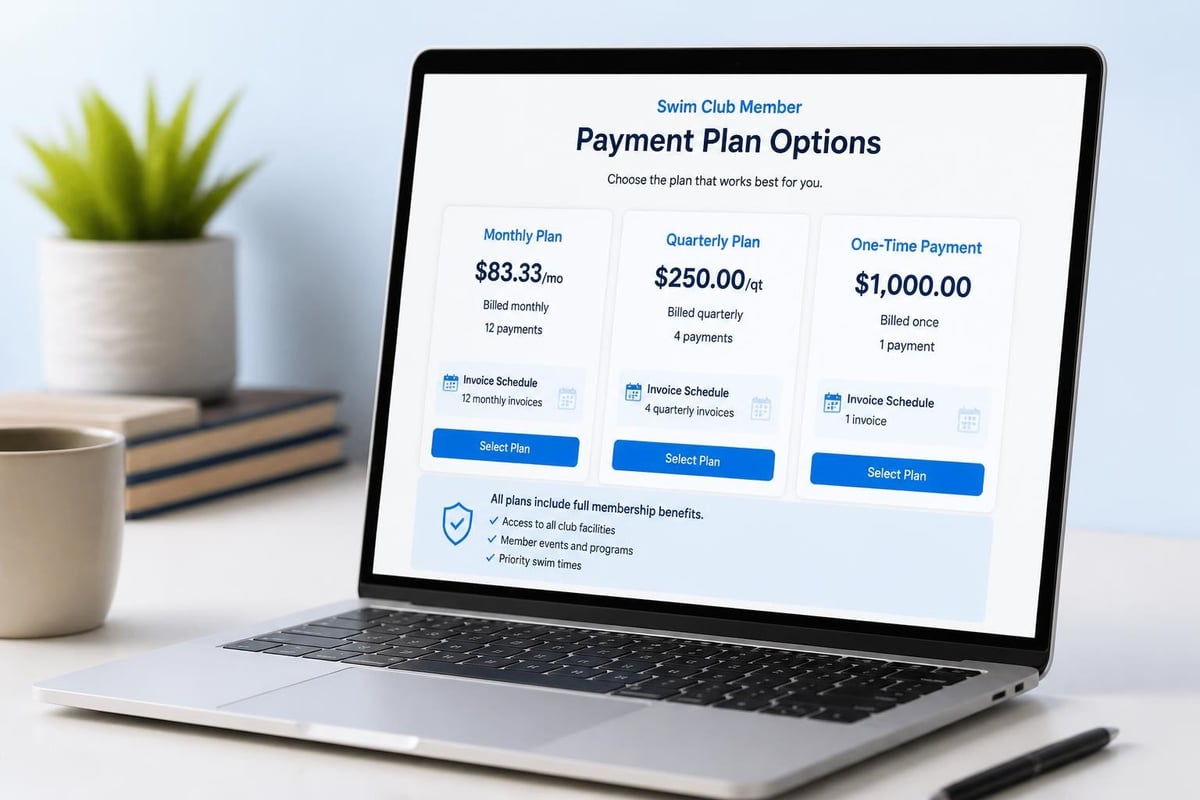
Some families need to spread payments out. Your system should handle payment plans without creating extra work for you. If the Johnson family needs to split their annual dues into 12 monthly payments instead of one lump sum, set that up once and let the system handle it.
Each month, their invoice generates automatically for that month's portion. They pay it (ideally automatically), and their account stays current. You don't think about it unless something goes wrong.
Integrating Member Communications
When you send an invoice, that's a communication opportunity. You're already reaching out, so why not include helpful information?
Smart clubs include in their invoice emails:
- Upcoming events and programs
- Pool hours for the upcoming period
- Policy reminders (like guest policies)
- Weather closures or maintenance schedules
- Special offers or member benefits
This turns a purely transactional email into something more valuable. Members are more likely to open and read it, which means they're more likely to see that payment due date.
Handling Refunds and Credits
Things change. Families move. Kids quit swim team. You close the pool for unexpected repairs. When you need to issue refunds or account credits, your pos and invoices system should make this straightforward.
The key is creating a clear paper trail. When you issue a credit, it should appear on the member's account with a clear explanation. When you process a refund, both you and the member should have documentation of what was refunded and why.
Refund situations you'll encounter:
- Member cancels before the billing period starts
- You have to close the pool and can't deliver the service
- You accidentally charged someone twice
- A family overpaid and has a credit balance
- Equipment was returned unused
Each of these needs a different approach, but they all require the same thing: clear documentation in your system so everyone knows exactly what happened.
Planning for Growth and Complexity
Your needs today might be simple. Maybe you run a small neighborhood pool with 100 member families. But what about in three years when you've grown to 300 families and added a competitive swim team?
The pos and invoices system you choose now should scale with you. Adding new revenue streams, like team fees or competitive meet hosting fees, shouldn't require starting over with a new system.
Look for features that you might not need today but will appreciate later:
- Multiple facility locations
- Different membership tiers with different pricing
- Family accounts vs. individual accounts
- Seasonal vs. year-round billing
- Integration with online registration
- Mobile POS for poolside transactions
Reducing Payment Friction
Every extra step between "I owe money" and "I paid" is a chance for members to procrastinate or forget. The easier you make it to pay, the faster you get paid.
Remove these common friction points:
- Requiring members to log in to a separate payment portal
- Only accepting payment during business hours
- Making members choose from confusing payment options
- Sending invoices without clickable payment links
- Requiring members to re-enter payment details every time
The gold standard is saved payment methods with automatic charging. Members opt in once, and their invoices get paid automatically on the due date. Your collection rate approaches 100%, and nobody has to think about it.
Of course, not everyone wants autopay. But for those who do, make it effortless to set up.
Making Reporting Actually Useful
At the end of the month, you need to know: How much money came in? Where did it come from? Are we ahead or behind budget?
Your pos and invoices system generates the data that answers these questions, but only if you can actually pull useful reports.
Reports you should be able to generate instantly:
- Revenue by source (memberships, programs, concessions, etc.)
- Outstanding receivables (who owes what)
- Payment method breakdown (cash vs. card vs. ACH)
- Member retention and renewal rates
- Revenue trends month-over-month and year-over-year
- Tax collected and owed
These aren't nice-to-have reports. They're essential for running your club responsibly. Modern member management software should generate these without requiring you to export data to spreadsheets and spend hours manipulating it.
Training Your Staff and Volunteers
Even the best system falls apart if the people using it don't understand it. Whether you have paid staff or rely on volunteers, everyone who touches your pos and invoices needs basic training.
Keep it simple. Create a one-page quick reference guide for common tasks:
- Processing a guest pass sale
- Registering someone for a program
- Looking up a member's account balance
- Applying a payment
- Issuing a receipt
The easier your system is to use, the less training you need, and the fewer mistakes happen. If it takes 10 clicks to process a simple sale, you've chosen the wrong system.
Preparing for Audits and Reviews
Most swim clubs are nonprofits or operate under HOA regulations, which means you might face periodic financial audits or board reviews. Having clean, organized pos and invoices records makes these events painless instead of panic-inducing.
Your system should let you pull historical data easily. If an auditor asks to see all transactions from Q2 2024, you should be able to generate that report in seconds, not spend days reconstructing it from multiple sources.
Security and Data Protection
You're storing sensitive member information: names, addresses, payment details, phone numbers. This data needs protection, both from hackers and from unauthorized access by staff or volunteers.
Basic security requirements:
- Encrypted payment processing
- Role-based access controls (not everyone needs to see everything)
- Audit trails showing who accessed what and when
- Secure password requirements
- Regular data backups
You don't need to become a security expert, but you do need to choose systems that take security seriously. Check if they mention PCI compliance, encryption, and secure data storage.
Moving Away from Spreadsheets
I know what you're thinking: "But we've always used spreadsheets, and they work fine."
Do they though? How many hours did you spend last month updating them? How many times did someone overwrite the wrong cell and mess up your formulas? How often do members question their balance because your spreadsheet and their memory don't match?
Spreadsheets have their place, but managing pos and invoices isn't it. They're too manual, too error-prone, and too difficult to keep synchronized across multiple people.
Making the switch to proper software feels like a big step, but it pays for itself quickly in time saved and mistakes avoided. A good swim club management solution brings everything together in one place, so you're not juggling multiple tools that don't communicate.
Seasonal Considerations
Most swim clubs have seasonality. Maybe you're open year-round but see higher attendance in summer. Maybe you operate from Memorial Day to Labor Day only. Your billing system needs to accommodate this reality.
Seasonal billing approaches:
| Approach | How It Works | Best For |
|---|---|---|
| Annual prepay | Members pay full year in advance | Year-round clubs with stable membership |
| Seasonal prepay | Members pay full season before opening | Seasonal clubs with loyal returners |
| Monthly during season | Bill monthly only while open | Clubs with fluctuating attendance |
| Hybrid | Annual members plus daily/monthly options | Clubs with diverse member needs |
Your pos and invoices setup should support whichever model makes sense for your club without requiring manual workarounds each billing cycle.
Getting Started with Better Systems
If you're currently struggling with disconnected systems and manual processes, here's how to start improving:
Step 1: Document your current workflow
Write down exactly how money flows through your club today. Every step from when someone signs up to when their payment posts to your books.
Step 2: Identify the pain points
Where do mistakes happen? What takes the most time? What frustrates members? What keeps you up at night during billing season?
Step 3: Prioritize improvements
You probably can't fix everything at once. What would make the biggest difference right now? Start there.
Step 4: Evaluate your options
Look for systems purpose-built for clubs like yours. Generic accounting software or retail POS systems won't understand your specific needs.
Step 5: Plan your transition
Moving to new systems takes time. Plan for a transition period where you might run parallel systems until you're confident everything is working correctly.
The investment in better pos and invoices management pays dividends in saved time, improved accuracy, and happier members. You didn't get into swim club management to spend hours on billing headaches. Get the right tools in place so you can focus on creating great experiences for your members instead.
Managing pos and invoices doesn't have to be the most frustrating part of running your swim club. When everything connects properly and updates in real-time, you spend less time chasing paperwork and more time on what actually matters. PoolPulse brings your transactions, billing, member accounts, and reporting together in one modernized platform designed specifically for swim clubs. Instead of juggling multiple systems that don't talk to each other, you get a clear view of every member's financial picture and automated workflows that keep things running smoothly without constant intervention.

Your Pool Needs More Than a Lifeguard on Duty
Swim club operators need systems that manage facilities, track maintenance, and protect members. Here's what works in 2026.

The Monthly Billing Chaos Test for Swim Clubs
Running monthly billing at your swim club shouldn't feel like chaos. Take this test to find billing mistakes before they cost you time and money.

The Busy Club Test: Is Your Software Keeping Up?
Running a busy club means juggling members, lanes, and walk-ins all at once. Here's how to tell if your software can handle the chaos.
Want to see if PoolPulse is a good fit for your club?
Book a walkthrough and we'll show you exactly how PoolPulse can help based on your club's needs, goals, and current processes.